Keys, settings and runners
Where a secret lives, where a setting lives, and who starts the container.
Who owns it decides where it lives
Three tiers, and the rule is always the same question: who owns this?
Project Settings — the team shares it
Committed to source control, because everyone on the project needs the same answer.
Output paths, naming conventions, which providers a project allows, quality defaults, the character-to-voice map.
Editor Preferences — per person, never committed
Editor Preferences ▸ Automation Forge ▸ <plugin>.
Which provider I use, my model choice, my local runner address, my notifications. Your colleague's choice of provider is not a property of the project.
The OS credential vault — secrets, and nothing else
Never in any .ini. Not in a project one, not in a user one.
Every Forge settings page was once tier 1 — including the credential fields, which meant a per-person secret had its page in a committed file. That was fixed in August 2026. If you are reading an old tutorial that shows a key field in Project Settings, it is out of date.
One Keys page for everything installed
Tools ▸ Keys in the editor, under the menu's Automation Forge heading, and the Keys drawer in the hub, are the same list: every key every installed plugin declares, with what it is for and whether it is set.
A provider account is entered once, and every set that needs it finds it.
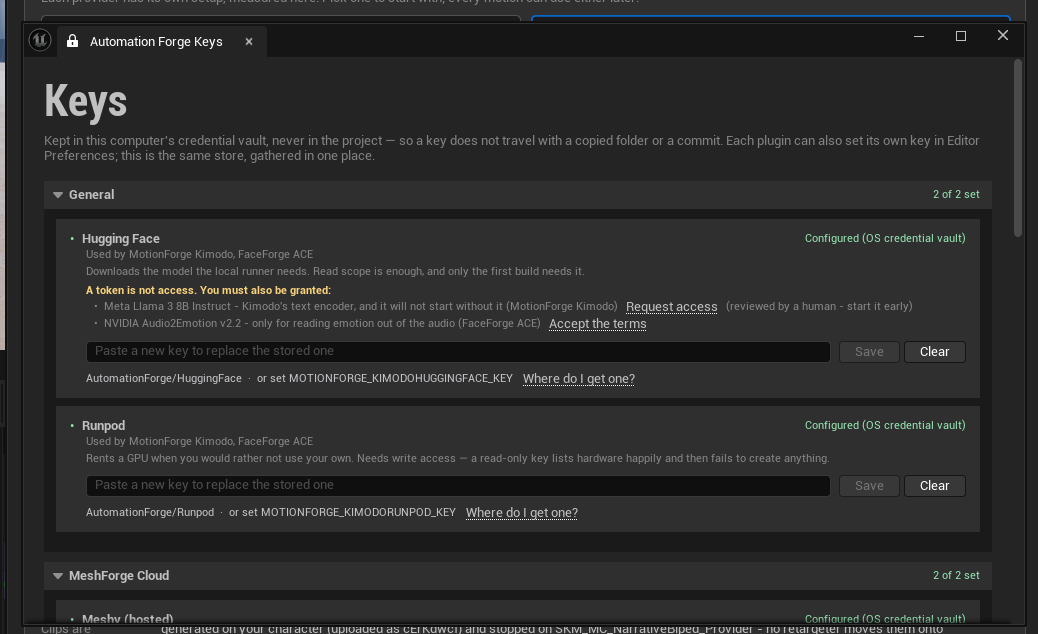
The Runpod line is worth reading twice: a read-only key lists hardware happily and then fails to create anything. That is a key which passes every check you would think to run and still cannot rent you a GPU.
Some keys belong to you, not to a plugin
A Runpod key and a Hugging Face token are accounts a person has. They are not owned by whichever plugin happened to ask first.
So they live in one family-wide entry that every plugin agrees on:
| Entry | Environment variable |
|---|---|
AutomationForge/Runpod | RUNPOD_API_KEY |
AutomationForge/HuggingFace | HF_TOKEN |
Set once, anywhere, and everything installed finds it. A plugin added next year inherits it with nothing to enter.
Naming an entry after the plugin that asked first is wrong in a way that only shows up at the second plugin — you get asked for the same key again, and now two copies have to be kept in step. This cost us an afternoon when MeshForge could not generate locally while the Hugging Face token sat in the vault the whole time, under a name only MotionForge knew to look for.
Where a key is actually read from
In order:
- The OS credential vault, at the entry the plugin declares.
- The environment variable the plugin declares, if the vault has nothing.
That fallback is what makes a build machine or a container workable without a human logging in to type a secret into a GUI.
If you are writing something that touches the vault
The blobs are UTF-8 and not null-terminated — written with
FTCHARToUTF8, read with FUTF8ToTCHAR, sized to the exact byte count.
Anything else reading or writing those rows must match, or it writes an entry
the editor decodes as mojibake.
Credentials are stored as generic credentials with
CRED_PERSIST_LOCAL_MACHINE, which is what lets the hub and the editor share
one row.
And: CredRead succeeding proves only that a row exists. It does not
prove the value is a working key. Testing a key is one authenticated call in
the provider's own shape, which is why that button is in the editor and not in
the hub.
Runners
A runner is something that has to be running before the editor can use a route: a Docker container on your own GPU, or a GPU rented by the hour.
The hub's Runners tab reads Docker state and container state from Docker itself, and Start and Stop act on it.
Start the runner before you open the editor. An editor that opens against a stopped container can only report a dead route, and the fix is a restart you did not need.
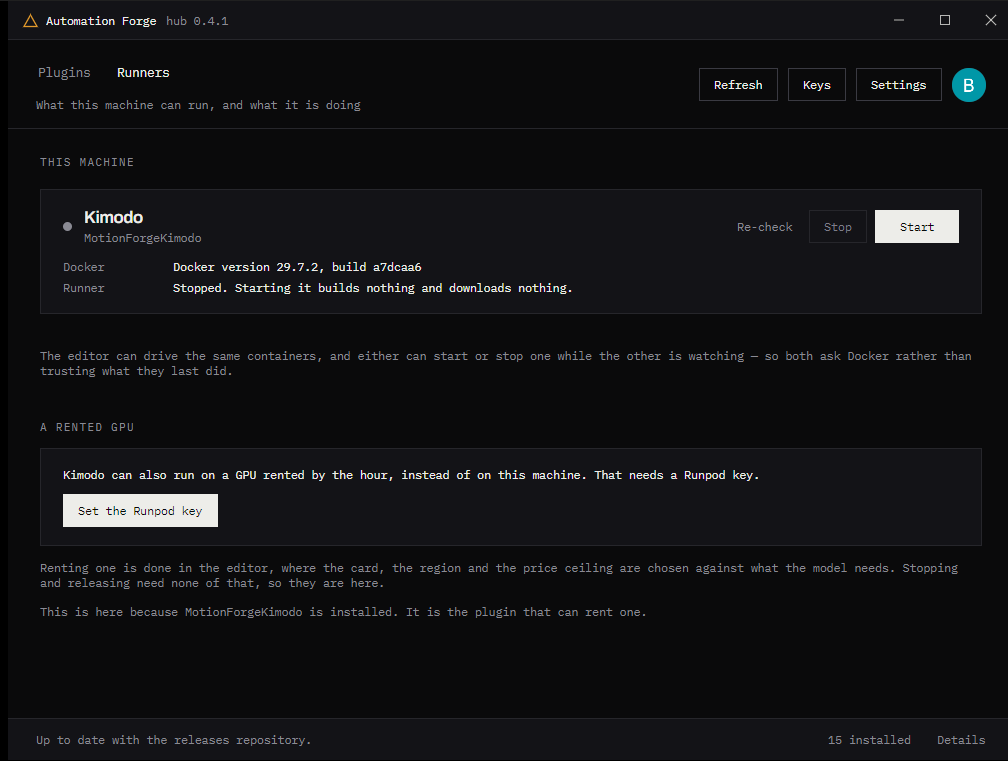
The line under the runner is the whole concurrency design in one sentence: "either can start or stop one while the other is watching — so both ask Docker rather than trusting what they last did." Two processes, one container, and no cached belief about its state.
Why the editor still creates the container
The hub can start and stop a container by id, because compose stamps labels on it that the hub can find. It cannot create one — the compose file interpolates a model cache, a token and a signature that only the plugin knows.
Likewise, renting a GPU stays in the editor: which card, in which region, under what price ceiling is a decision made against what a specific model needs. The hub lists what is rented, says what it costs, and stops or releases it.
The hub's own wording for the split is the clearest statement of it: "Renting one is done in the editor, where the card, the region and the price ceiling are chosen against what the model needs. Stopping and releasing need none of that, so they are here."
Here is the editor half of the same runner:
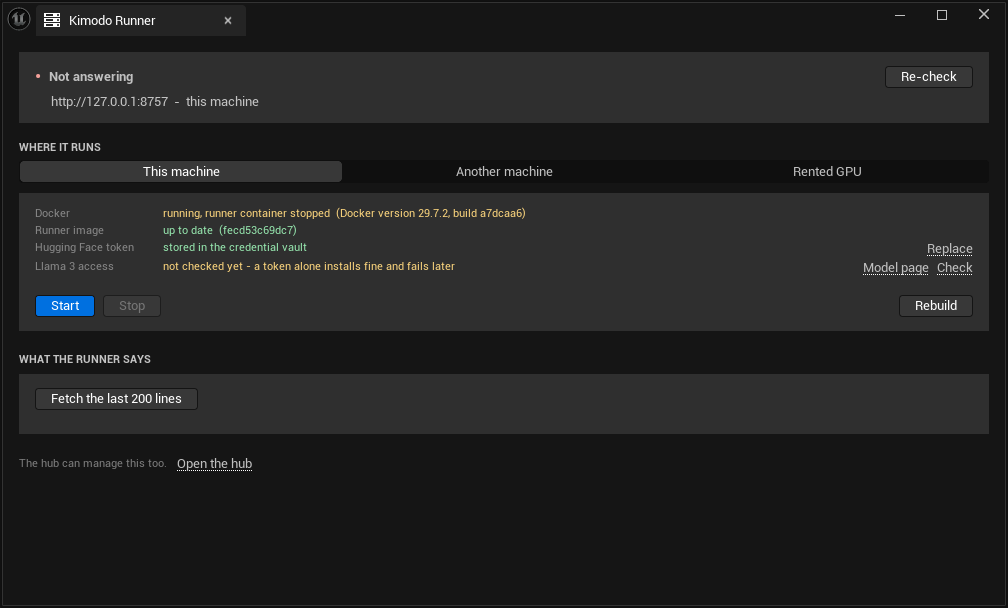
Note the two panels disagree about nothing while describing different things. The hub reports what is running; the editor reports whether this route can work — the image, the token, the grant. Both read Docker for the container's state rather than remembering it.
A rented GPU bills while it exists, not while it is busy. The hub showing it as running is the bill still running. Release it when the work is done — this is the single most expensive thing to forget in the whole product.