SpeechForge
Write a line, generate it, and get a sound wave with character-level timing attached.
Write a line, generate it with a speech provider, and get a USoundWave
imported into the project with character-level timing data attached.
One pipeline end to end: resolve the voice, price it, synthesise, import, cache.
For the route end to end — cast, write, generate, record, solve, localise — see the dialogue pipeline. This page is about SpeechForge's own half of it.
| Plugin | Role | Licence | Version |
|---|---|---|---|
| SpeechForge source | coreThe subsystem. Install this one. | Open | 0.2.2 |
| SpeechForgeDeepL | providerA route to a generator — a vendor API, or a container on your own GPU. | Paid | 0.1.2 |
| SpeechForgeElevenLabs source | providerA route to a generator — a vendor API, or a container on your own GPU. | Open | 0.1.1 |
| SpeechForgeToolset source | toolsetThe same subsystem as typed MCP tools, for an agent. Adds nothing of its own. | Open | 0.2.2 |
What it deliberately does not know
SpeechForge knows nothing about dialogue trees, subtitles, montages, facial animation or any gameplay framework.
Those are adapters built on top — the Narrative Pro one lives outside this set. It also ships no providers itself; each registers against it at module startup.
The screenwriter model
The shape it was designed around: any dialogue scene has speakers. Define them — identity, voice, provider. Then write lines and assign them to speakers. Then generation and performance on top.
Cast
A Speaker (SP_) is the character sheet: an id, a display name, casting
notes, a voice profile, and bindings out to whatever framework you use.
The set of speaker assets is the cast list. There is no separate list to keep in step.
Write
Lines, with text and direction, each assigned to a speaker — and a per-line voice override where one line needs something different.
Produce
Price the selection, generate, import. The pipeline table shows what is current, what is stale and why.
Perform
Take the generated audio onward — faces, body motion, and the rest.
A fifth page, Ingest, brings lines in from somewhere else.
Voice resolution walks four steps
| Step | Beats |
|---|---|
| 1. Line override | Everything |
| 2. Speaker sheet | The bank and project defaults |
| 3. Bank default | The project default |
| 4. Project default | Nothing |
Every result is stamped with which step answered. A voice that turned out wrong is then a question with an answer, rather than an archaeology expedition.
Staleness is computed live, over the resolved request
The content hash is taken over the resolved request — text, concrete voice id, model, settings, seed — rather than stored, and rather than taken over an asset reference.
So re-pointing a voice profile somewhere else is caught, not silently missed.
A hash is an answer to a question, and the staleness check must ask the same question.
Synthesis is a function of the text, so a generated line hashes its text. A voice conversion never reads the text at all, so it hashes its source audio and its voice. An early version stored a conversion hash but recomputed a text hash to test freshness — two different questions compared as one — so every converted line read as permanently stale, blaming the one thing that could not have mattered.
Anywhere a hash is written down, check every place it is recomputed.
Graduation has two axes
Not one status, but two independent ones:
| Axis | Values |
|---|---|
| Status | Where the line is in the pipeline |
| Origin | Where the audio came from: Generated, Accepted, Edited, Recorded |
That separation makes "stale and already recorded" expressible — and that is the one report with real money attached, because it is the list of lines somebody paid an actor for and then changed the script under.
They are two columns in the panel for the same reason:
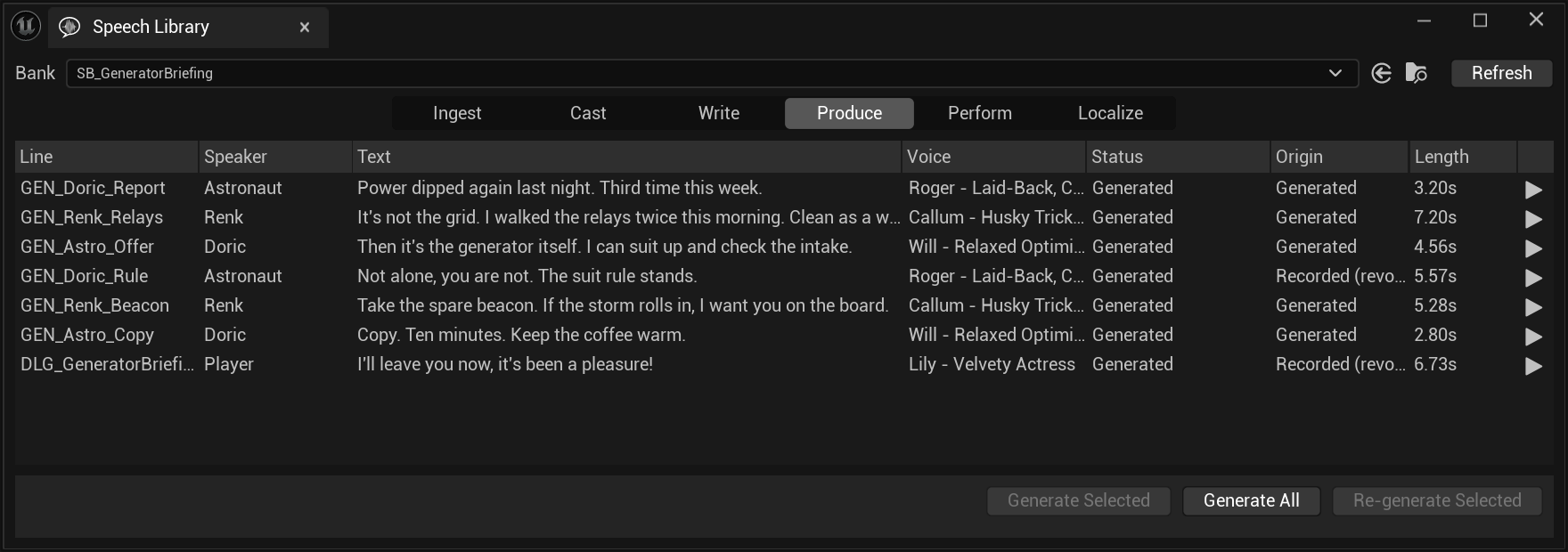
The four buttons on Produce
They look like variations on one action. They are four different promises about money.
| Button | What it does |
|---|---|
| Generate Selected | The selection, skipping what is current |
| Generate All | "Generate every line in this bank that is missing audio or stale. Current lines cost nothing and are skipped; recorded lines are never touched. Safe to press twice — the second press finds nothing to do." |
| Dub from Source | Only on a localised bank. See localisation |
| Re-generate Selected | "Force: re-generate the selected lines whether they are current, stale or missing, after a confirmation with the cost. The one thing force never does is overwrite a recorded performance — those lines are skipped." |
Nothing spends without a priced question first
Every one of them raises a confirmation naming the count and the figure, and the figures come from the same resolver that submits — so the estimate is the price of the request that would go.
Generate All, on a bank with work to do:
Generate N line(s) that are missing audio or stale, ~X.XXX USD?
M current line(s) are skipped and cost nothing. Recorded and hand-edited lines are never touched.
Re-generate Selected adds a paragraph per thing you should know, and the whole scene selected looks like this:
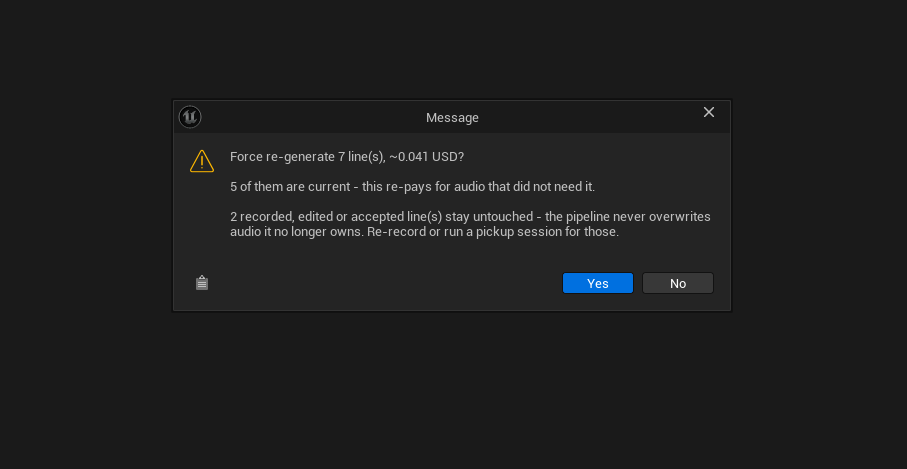
The second paragraph exists to talk you out of it. Force is for the case where a line looks current and is not; the dialog counts how many of your selection are in fact current and says plainly that you are about to pay for them again.
The third is the one that cannot be overridden. "The pipeline never overwrites audio it no longer owns" is not a warning about this press — it is a statement that those two lines are outside force's reach entirely, and the only routes to them are a re-record or a pickup session.
On a bank where there is nothing to do, Generate All does not open a dialog at all — it answers "Everything is current — nothing to generate."
For scale: the seven-line scene these captures come from is 411 characters, which is the ~0.041 USD in the dialog above. Character-billed synthesis is cheap per line; the dialogs exist because a bank is not seven lines, and because a forced re-generation of a thousand current lines is a real way to waste a real amount of money.
Generated audio is never discarded when a line graduates to Recorded,
and a forced regeneration explicitly refuses to touch anything that is not
Generated.
Provenance follows the source, not the operation. Re-voicing a
recording — or any audio the pipeline cannot attribute — graduates to
Recorded. Unattributable audio counts as a recording deliberately, so that
nothing can overwrite a performance that cannot be regenerated.
Alignment
Timing always comes from the provider's timestamped endpoint, trimmed and re-based so direction tags inside the sent text do not throw off subtitle timing.
Where that re-basing cannot be trusted, the result says so with a flag rather than quietly shipping timings that are a few hundred milliseconds out.
Where to go next
Concepts
Banks, lines, handles, takes and where audio lands.
Casting
Speakers, voice profiles, and the Cast page.
Providers
ElevenLabs, and what a provider declares about itself.
Localisation
A bank per language, dubbing, and why a line keeps its id. Paid.
The toolset
The whole pipeline, for an agent.