PerformanceForge
A miniature performance-capture stage inside the Unreal editor.
Records a performer's microphone and webcam onto one take clock — voice alone, or voice and video — and files every take with a manifest.
Paid. Bought once on the account app. Its toolset is open — see distribution.
PerformanceForge is the middle third of the dialogue pipeline: the lines come from SpeechForge, and the video goes to FaceForge. It links against neither.
| Plugin | Role | Licence | Version |
|---|---|---|---|
| PerformanceForge | coreThe subsystem. Install this one. | Paid | 0.1.1 |
| PerformanceForgeToolset source | toolsetThe same subsystem as typed MCP tools, for an agent. Adds nothing of its own. | Open | 0.1.1 |
The panel
Two pages: Record, the teleprompter, and Session, the ledger.
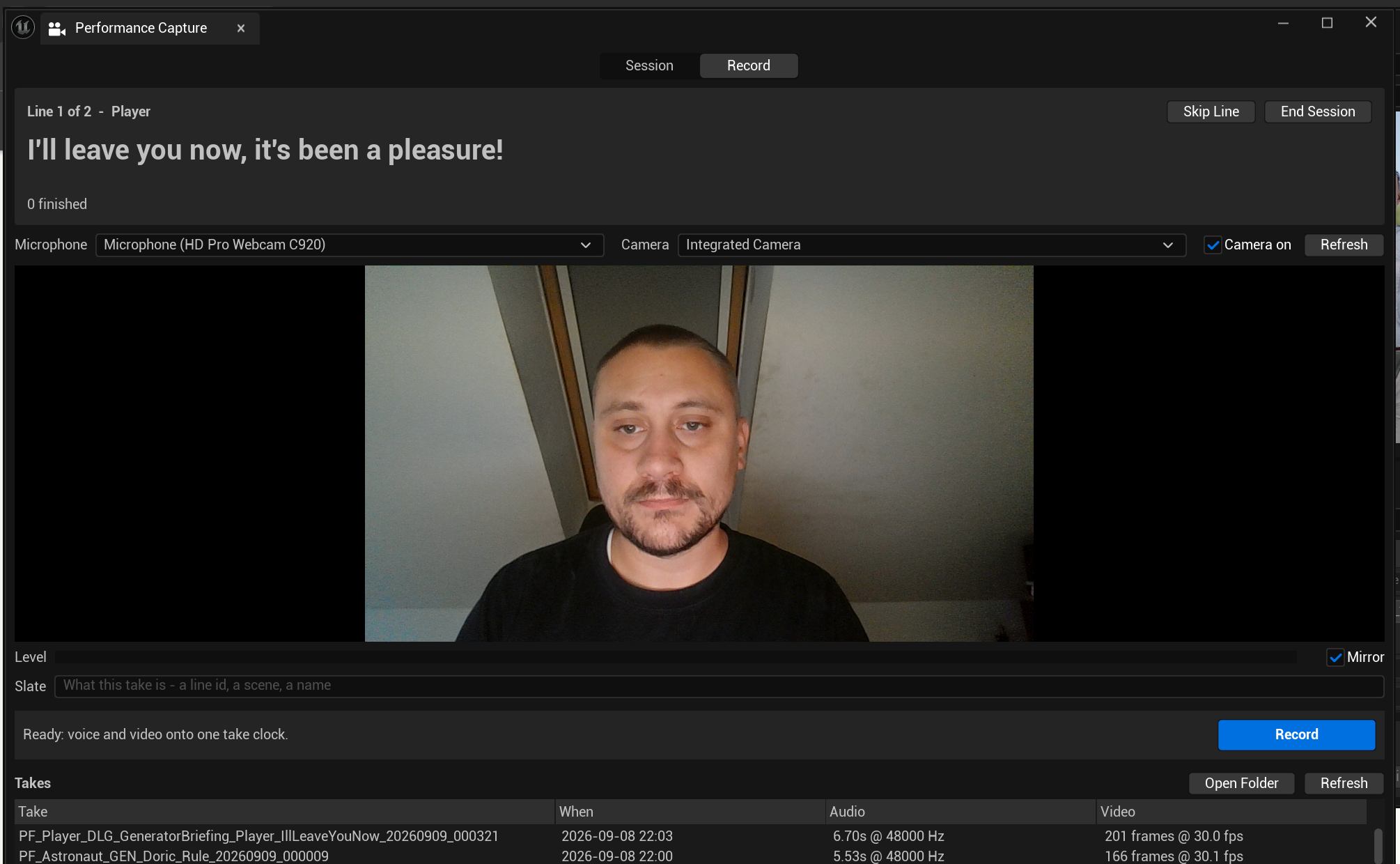
Read the Video column, not the frame-rate setting. One take reports 30.0 fps and the other 30.1 fps, from the same webcam minutes apart. Those are measurements from the take clock, not a nominal figure — which is exactly why the solve that consumes them stays in sync.
Recording
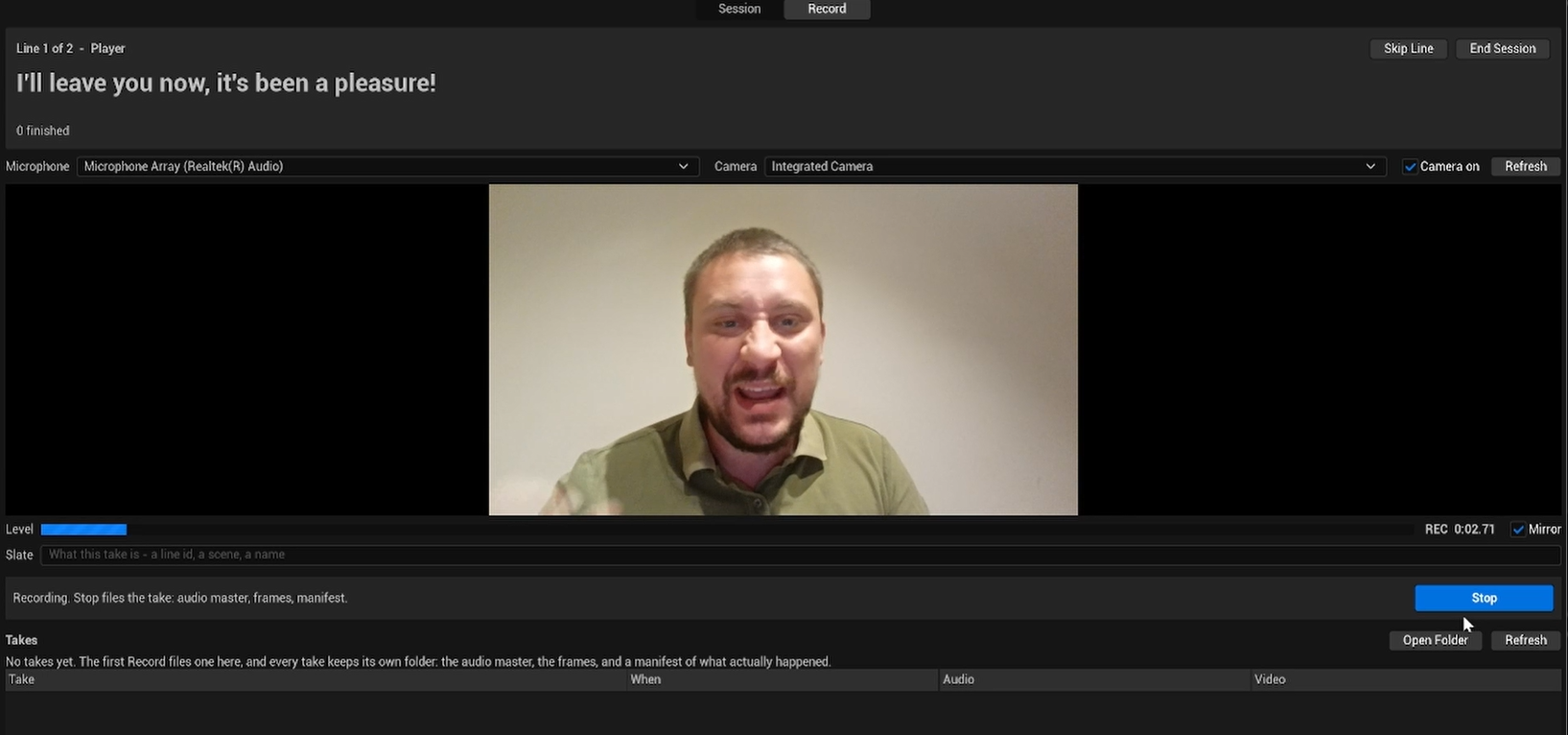
"Stop files the take: audio master, frames, manifest." That order is the completeness protocol stated in the interface. The manifest is written last, so a take folder without one is an interrupted recording and nothing downstream has to guess.
The take list still reads "No takes yet" during the recording, because a take that has not been filed does not exist yet.
Every control on it
| Control | What it does |
|---|---|
| Session / Record | Session is the ledger: the job's lines, every take and retake, and the choose. Record is devices, preview, teleprompter, record bar |
| Skip Line | Move past this line without recording it |
| End Session | Drop the queue. The session asset and its takes stay |
| Microphone | Input device, listed as name (channels, sample rate) |
| Camera | Video device, or none — which is what decides the mode |
| Camera on | "Whether the camera is open. Off closes the device and the capture light goes out; recording video needs it on. Closing this window closes it too." |
| Refresh | "Re-read the device lists. Plug a headset in and the indices shift; this is the fix." |
| Level | Live input meter |
| Mirror | "Flip the preview like a mirror, so moving left looks left. Preview only — the recording always keeps the true orientation, because the solver needs the performer's real left and right." |
| Slate | "What this take is — a line id, a scene, a name." It becomes part of the take folder name |
| Record | Starts and stops. The line above it says which mode is armed |
| Takes / Open Folder | "Open the selected take's folder in Explorer." |
Mirror is the one that has to be explained rather than guessed. A performer frames themselves in a mirrored preview because an unmirrored one is unusable; a solver needs the performer's real left and right. Both are true at once, so the preview mirrors and the recording does not.
An empty take list says so in full rather than sitting blank: "No takes yet. The first Record files one here, and every take keeps its own folder: the audio master, the frames, and a manifest of what actually happened."
The asset
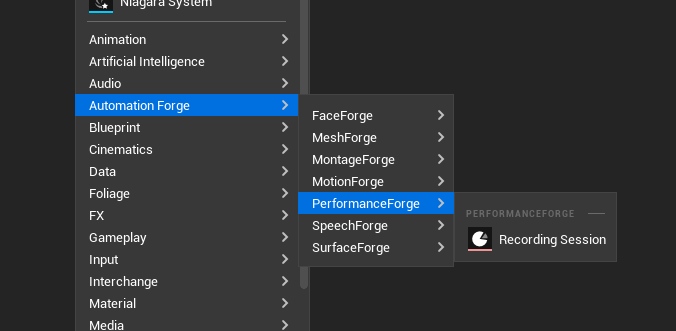
A session is an asset, made from Content Browser ▸ right-click ▸ Automation Forge ▸ PerformanceForge:
Why this exists
Because a recorded human performance is a route like any other.
If "we generated it" and "we recorded it properly" land in different places, with different provenance, and cannot replace each other — then the whole replace it safely promise is only true for generated content, which is the half that needed it least.
What it is, and is not
It is: capture, sessions and take management.
It is not: face solving (that is FaceForge), voice conversion (that is SpeechForge), or body motion (that is MotionForge).
It reaches all three by name through the toolset registry, and never links against them — so a missing plugin is a missing step with a reason, rather than a link-time failure.
The manifest records what was measured, never what was requested
A take folder holds a 16-bit PCM WAV master, JPEG frames named by media-clock ticks, and a manifest written last — its presence is what "complete" means.
The manifest records:
- the audio's real sample rate,
- the frame count actually on disk,
- the frame rate measured from tick deltas, rather than a nominal figure.
Because webcams drop frames as normal behaviour. A manifest saying "30 fps" because 30 was requested is a manifest that will desynchronise audio and video downstream, and nobody will know why.
Measured-not-requested is the rule, and it is why playback uses the frames' own timing.
Two modes, decided by one choice
Whether a camera is selected:
| Mode | What is captured |
|---|---|
| Voice only | The microphone master alone |
| Voice and video | Microphone and webcam on one take clock |
Device selection is remembered per user, per machine, with a live preview. The preview mirrors by default for framing; the recording always keeps true orientation.
Verified, and what broke
Driven end to end through the panel: a 5.8 s voice-only take (48 kHz stereo WAV matching its manifest exactly, read back with an independent parser) and an 8.1 s voice-and-video take (227 real 1280×720 JPEG frames at 28.03 fps measured, manifest complete). Device enumeration and preview survive an editor restart.
Two failures found and fixed the same night, both worth knowing if you build anything similar:
The camera's NV12 samples are refused by the engine's own media recorder. Frames are now read back from the GPU-converted preview texture instead.
An unfocused editor throttles itself to about 3 fps, which would ruin every take recorded while the performer looked at their script. Capture now suspends and restores that throttle, exactly as the engine's own Take Recorder does.
Your takes stay yours
Take storage lives on the free side, in SpeechForge's core.
So a customer who stops paying for PerformanceForge keeps every take they recorded, and loses only the surface that plans, records, reviews and chooses.
That is deliberate. Recordings are the one thing in this product that cannot be regenerated.
Console
PerformanceForge.Panel
PerformanceForge.Devices
PerformanceForge.Record <seconds> [av] [slate]
PerformanceForge.Stop
PerformanceForge.Takes
Every panel action has a console equivalent.
Not built
Real in-editor video playback of a take is deferred. Today: audio playback plus the frame folder opened on disk.
The reasons are concrete — no container file exists, no encoder is bundled, the timing is variable and measured, A/V sync would be manual, and cache pressure is real. The ladder out is a frame scrubber, then a hand-rolled-clock image-media player, then encoding at capture; the last is gated on an encoder licensing decision.
A body-motion adapter off the same webcam video is explicitly MotionForge's future work, not this plugin's.
Sessions and takes
The teleprompter, the ledger, and the two dials that replace two products.
The toolset
Six tools, two of which are buttons in another plugin's panel.