MeshForge
Turn a prompt or a reference image into a game-ready static mesh, finished and imported.
MeshForge owns one pipeline end to end: submit to a provider, poll, download, import — and finish with collision, lightmap UVs, Nanite and a sized, grounded pivot.
It ships no generator of its own. Every provider, local or hosted, registers through the same interface, so an empty provider list is a normal state rather than a fault.
| Plugin | Role | Licence | Version |
|---|---|---|---|
| MeshForge source | coreThe subsystem. Install this one. | Open | 0.3.0 |
| MeshForgeCloud | providerA route to a generator — a vendor API, or a container on your own GPU. | Free | 0.3.0 |
| MeshForgeGarment | postRuns after generation, on the result. | Paid | 0.2.0 |
| MeshForgeGarmentToolset source | toolsetThe same subsystem as typed MCP tools, for an agent. Adds nothing of its own. | Open | 0.1.0 |
| MeshForgeToolset source | toolsetThe same subsystem as typed MCP tools, for an agent. Adds nothing of its own. | Open | 0.3.0 |
| MeshForgeTrellis | providerA route to a generator — a vendor API, or a container on your own GPU. | Free | 0.0.3 |
| MeshForgeTrellisToolset source | toolsetThe same subsystem as typed MCP tools, for an agent. Adds nothing of its own. | Open | 0.0.3 |
Five stages
The unit of work is a Mesh Definition, and it has five stages:
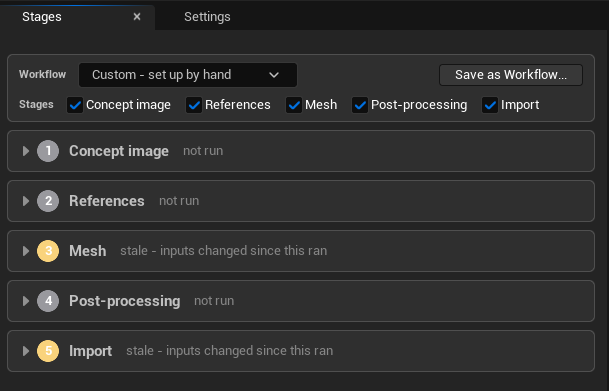
The tick-boxes above the list are per definition, not global. Turning one off hides that stage, excludes it from staleness, and makes every tool refuse it — which is how a definition that starts from a mesh you already have simply has no Concept or References stage to answer for.
Concept
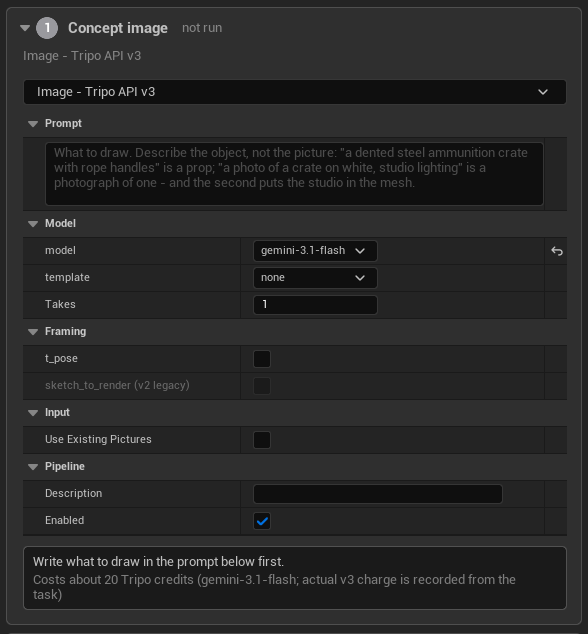
Draw a reference image from a prompt. The mesh generators here reconstruct from pictures, so this stage is often where the real art direction happens — get the reference right and the mesh follows it.
References
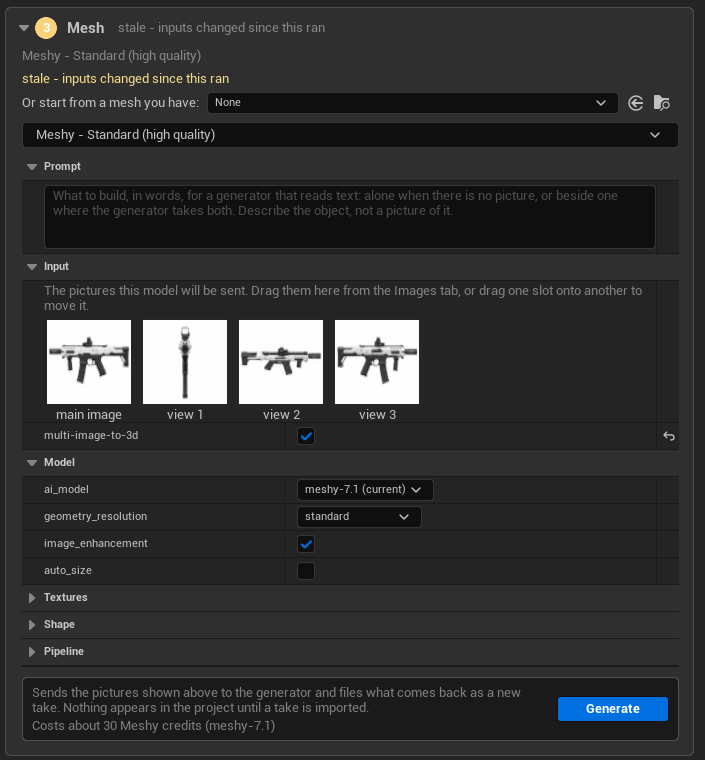
Choose which pictures the generator sees — a main image plus up to three extra views.
Half built. Choosing pictures works. Making more pictures — a Refine pipeline for background removal or extra angles — does not exist.
Mesh
The generation itself. A generator declares whether it builds from words, a picture, or either, and the settings, the refusal, the quoted price and the take record all follow that.
Post
A chain of steps on the result: retexture, edit in Blender, garment fit, sculpt.
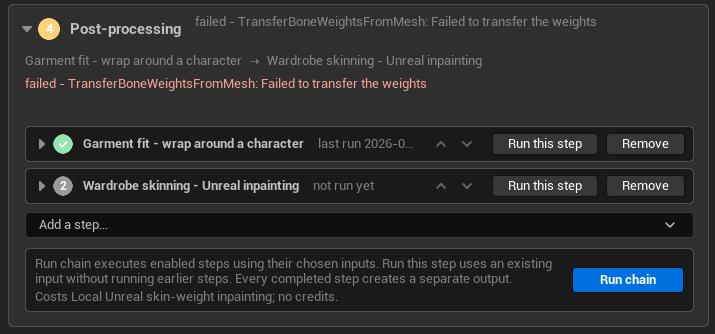
See post-processing for input sources, reordering rules and the steps that ship.
Import
Collision, hull count, size, pivot, Nanite, lightmap resolution.
Re-finishing is free — all of it re-applies with no provider call.
Every stage is re-runnable and stale-tracked by a hash chain: editing an early stage marks everything after it stale without discarding what it made.
Any stage can be switched off per definition. A switched-off stage is hidden from the tabs, refused by every tool, and left out of staleness.
Read the status words rather than the tick marks. "Not run" and "stale" are different claims: the first means this stage has produced nothing, the second means what it produced no longer matches its inputs. Only the second is a reason to spend anything.
A definition is a recipe, not a receipt
Pictures, quality, seed, polygon budget and finish settings are recorded on the asset. Point a definition at a seeded provider and it can be regenerated identically.
Each prompt belongs to the pipeline that reads it — the concept image pipeline's words, the mesh generator's words where its provider takes text, a retexture step's own style prompt. There is no definition-wide prompt, because a single prompt shared by three stages was never true.
Workflows
A Mesh Workflow is the stage switches, the pipeline on each stage, the post chain with its settings, and optionally the import settings — in one choice.
A new definition asks which workflow to start from, before anything else:
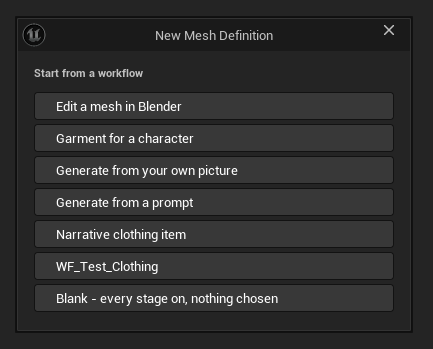
Three ship with MeshForge itself:
| Workflow | For |
|---|---|
WF_GenerateFromPrompt | Words in, mesh out |
WF_GenerateFromPicture | A reference image in |
WF_EditMeshInBlender | A round trip through Blender |
The rest of that list comes from elsewhere. Garment for a character
arrives with MeshForgeGarment;
Narrative clothing item comes from a plugin in the project that is not part
of Automation Forge at all; WF_Test_Clothing is an asset somebody in the
project made and never gave a display name.
Workflows are extensible the same way post steps are. A studio with its own conventions ships them as assets, and they appear in this list beside the ones MeshForge brought.
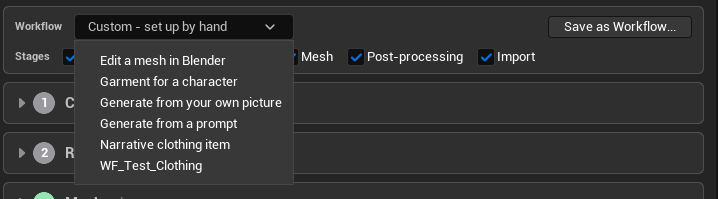
Applying a workflow copies it into the definition, so a definition is never bound to the workflow it started from. The Stages tab can reapply one — keeping prompts, pictures, source mesh, takes and the outputs of steps still in place — list what has changed since, and Save as Workflow:
What it deliberately does not do
MeshForge generates static meshes and rigs nothing.
It does now store, show, thumbnail and round-trip the skeletal meshes that post steps such as garment skinning produce — but it makes no skeleton itself.
Cost before spend
What would this cost? runs through the same resolver as submission, so the quote is the price of the request that would be sent.
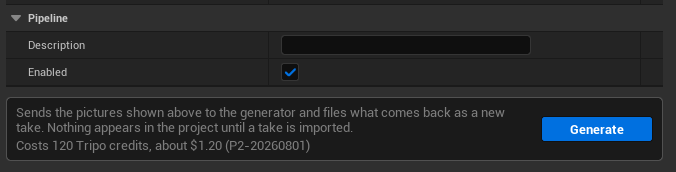
"About $1.20" appears here because Tripo publishes a credit rate. A Meshy take in the same project records 30 credits and no dollar figure, because that vendor does not — and the record says so rather than guessing a conversion.
A contradictory generator setting is refused where the panel and agent routes converge — so an agent cannot submit what the Stages tab would have refused.
Where to go next
Concepts
Definitions, takes, staleness, and where everything lands.
Providers
TRELLIS.2 locally, Meshy and Tripo hosted.
Post-processing
Chains, input sources, and the Blender round trip.
Garment
Fitting clothing to a character, and the Garment Studio. Paid.
The toolset
What an agent can do, and the three things it cannot.