Post-processing
Chains, input sources, the Blender round trip, and steps other plugins add.
The Post stage is a chain of steps. Each one takes a mesh and produces another, or produces an asset.
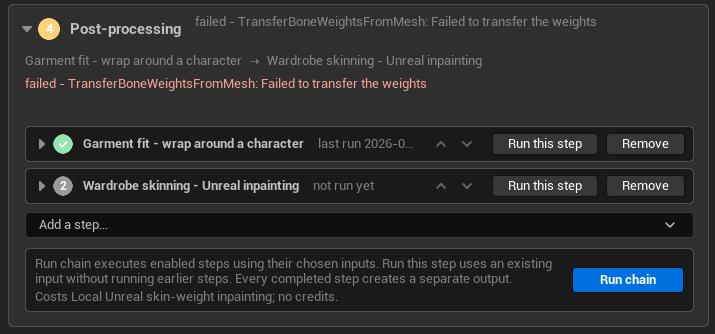
Two different run buttons, and the difference is money. Run chain executes the enabled steps in order. Run this step takes an existing input and runs one step without re-running anything before it — which is what makes retrying the failure above cost nothing but the skinning.
Every completed step creates a separate output, so a step that worked is still there to be used after a later one breaks.
Where a step's input comes from
Four sources, chosen per step:
| Source | What it means |
|---|---|
| Step above, latest run | The default. For the first step, the Mesh stage's selected take |
| Mesh stage's selected take (or Source Mesh) | Skip everything above |
| Selected mesh / saved output | Something already in the project |
| A step's output | A chosen step, and a chosen run of it. The Mesh stage is listed first, and its finished takes count as its runs |
Steps can be reordered with up/down arrows. A move that would produce a chain the executor could not run is greyed with the reason.
The ordering rule: steps that make assets rather than geometry may follow one another, but nothing that works on geometry may follow them. A step's input may be a skeletal mesh where the step takes one.
A retexture only points at a vendor's copy while that copy is still ours
A step that moves vertices declares that it changes geometry. The chain remembers this, and one decision decides whether a retexture can reference the vendor's own copy of the mesh or must upload ours.
Without that, a retexture after a Blender edit would texture the mesh before the edit — and look plausible.
Edit in Blender — the round trip
A post step a person finishes in Blender.
- Optional locked reference meshes stand beside the subject.
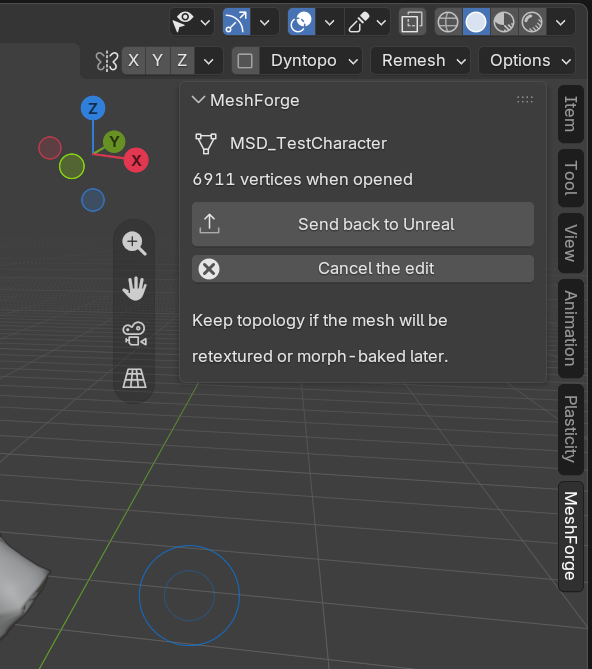
- A MeshForge sidebar tab appears in Blender.
- The chain waits for Send back to Unreal, and a result sent later can still be picked up.
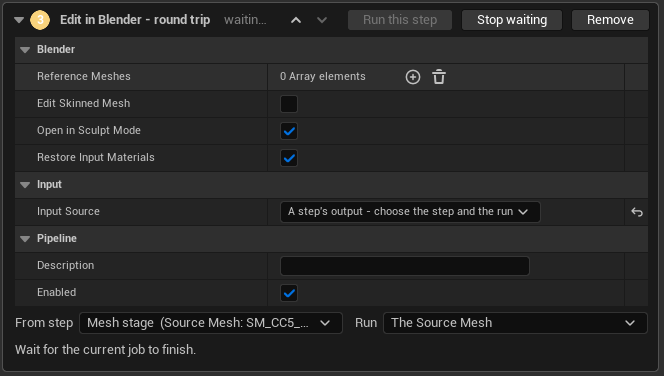
The From step / Run pickers under Input Source are the "a step's output" case made concrete: not just which step, but which run of it. That is what lets you send the third attempt to Blender rather than whichever ran last.
Blender opens on the mesh, in Sculpt Mode if the step asked for it:
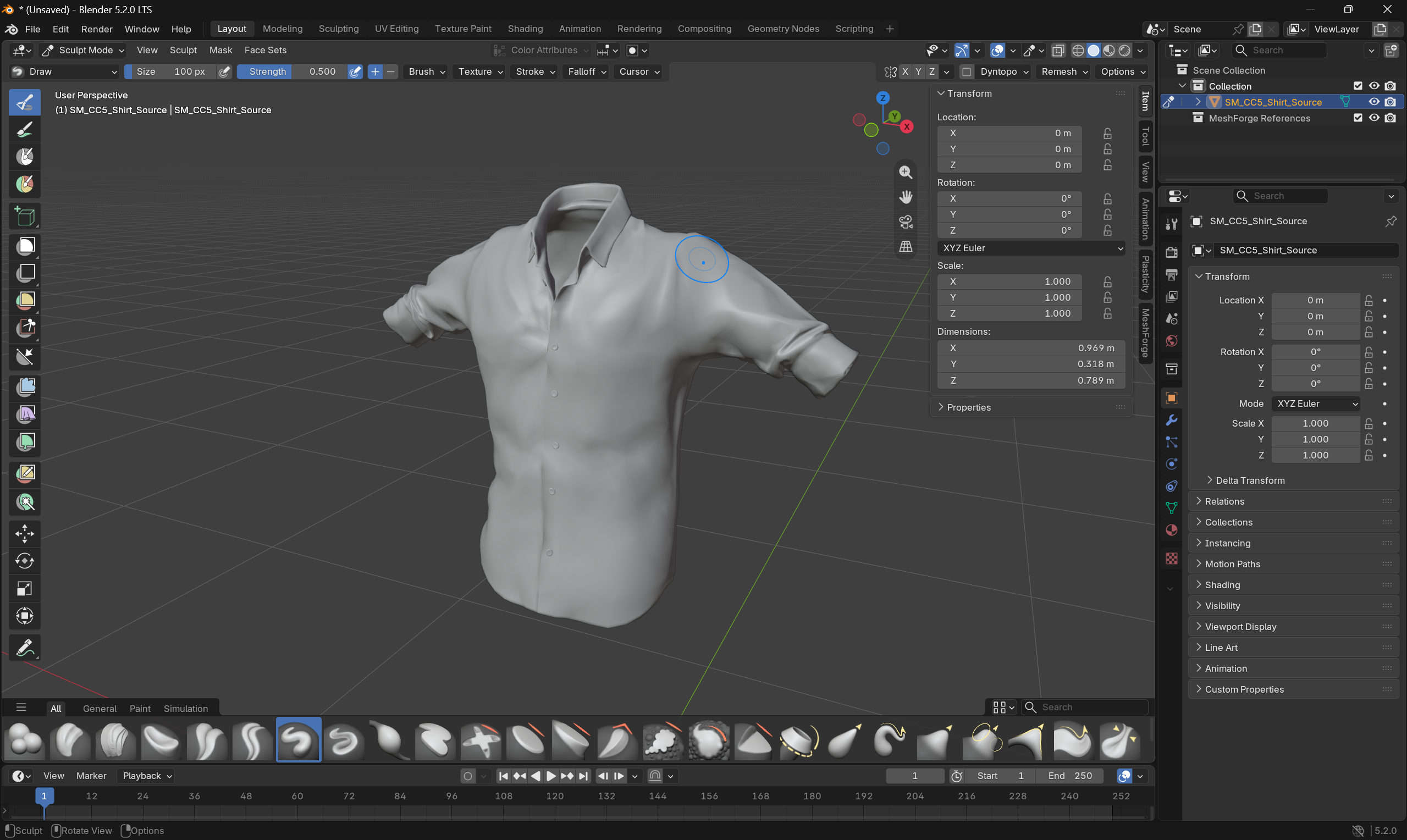
With Edit skinned mesh it works on a skeletal mesh and brings back a copy of the same asset with its vertices moved — skeleton, weights, morph targets and materials untouched.
Topology must come back unchanged, or the step refuses and says so with both counts. Moving vertices is supported; adding or removing them is not, because the weights and morph targets on the Unreal side are indexed by vertex.
The Blender executable is set in Editor Preferences, per user.
If you are writing Blender steps of your own, two traps worth knowing: glTF import in Blender has its own conventions that do not round-trip naïvely, and FBX export to Unreal must be in centimetres or everything arrives at the wrong scale.
Steps a person finishes inside the editor
There is a defined interface for a step that opens a window, hands the mouse to a person, and resumes the chain when they are done — covering the interactive input, the result asset, a command channel, and whether a session is needed.
The Garment Studio and the sculpt step are the users of it.
Steps from plugins that do not link MeshForge
A header-only extension lets another plugin register a post step without linking MeshForge at all — a settings class and a game-thread function.
They appear under From other plugins in the step picker. A definition opened without the registering plugin keeps the step and names it, rather than dropping it silently.
This is how an add-on outside the Forge monorepo entirely — a project's own clothing plugin, say — contributes a step. The shared Forge plugins are optional by design: a header-only interface costs a dependent nothing.
What ships in the family
| Step | From |
|---|---|
| Edit in Blender | MeshForge |
| Meshy retexture | MeshForgeCloud |
| Tripo retexture | MeshForgeCloud |
| Garment fit | MeshForgeGarment (paid) |
| Wardrobe skinning | MeshForgeGarment (paid) |
| Sculpt mesh | MeshForgeGarment (paid) |
Free re-finishing
Collision, hull count, size, pivot, Nanite and lightmap resolution all re-apply with no provider call.
Separating expensive generation from free refinishing is the rule everywhere in this family — see providers are infrastructure.
Nanite everywhere is a trade. Turning it on across the board trades one class of warning for another, and it breaks material slots that rely on non-Nanite paths — glass in particular. Decide per asset kind rather than globally.