Sessions and takes
The teleprompter, the ledger, and the two dials that replace two products.
The session asset
A session is a PS_ data asset with four kinds of field on it. It lives in
project content because it references banks and should travel with the
project.
| Group | Field | What it is |
|---|---|---|
| Session | Notes | What this session is for, for whoever inherits it. "EP1 pickups with Mara." |
bAdHoc | Read-only. True when Record Selected… made it rather than a person | |
CreatedAt | Read-only | |
BankPaths | Read-only, asset-registry searchable — every speech bank this session's lines belong to | |
| Fixtures | Mode | Voice Only or Voice and Video |
bFaceOnly | The camera is the point and the line's audio is out of bounds | |
Treatment | Convert to cast voice, or Use performance as-is | |
FaceBankPath | Where solves land. Empty skips the face chain entirely | |
| Dials | Save Takes | Whether recordings accumulate as candidates, or the newest becomes the line |
bProcessImmediately | Whether the finisher runs at stop, or nothing spends until a take is chosen | |
| Lines | Lines | The planned lines, in performance order |
BankPaths is a list, not a path, and that is deliberate. A
character-centric session — all of one artist's lines — legitimately spans
banks, so it appears under each of them. Being registry-searchable is what
makes "which sessions cover this bank?" a query with nothing loaded, which
is what keeps a session findable from the bank it serves instead of lost
under a timestamp in the Content Browser.
The two treatments
| Treatment | What happens to the performance |
|---|---|
| Convert to cast voice | Speech-to-speech into the line's cast voice. The performance stays; the identity changes |
| Use performance as-is | The performer's own voice becomes the line's audio. The classic studio flow |
Both graduate the line to Recorded and both keep the generated take as the
reference. They differ only in which WAV is applied.
A session is two dials, not two products
The temptation was to ship "solo mode" and "production mode". Instead, a session asset carries two independent dials:
| Dial | What it decides |
|---|---|
| Save takes | Whether every take is kept, or latest wins |
| Process immediately | Whether the finisher runs on stop, or waits for a choice |
Save Takes is not about saving to disk. Every take is written to disk and its audio imported either way. The dial decides whether the recordings accumulate as candidates or whether the newest one simply becomes the line.
It matters afterwards, too: turn it on mid-session and the ledger lists everything from that point, but the takes made while it was off will not be found, because they were never written down. The panel says so where the list would otherwise read as broken.
Two actions set them for you:
- Record Selected… auto-creates an ad-hoc session defaulted to solo behaviour: latest wins, process immediately.
- Plan Session… creates a planned one: every take kept, nothing processed until a take is chosen.
Two dials rather than two modes means the in-between cases exist. "Keep every take and process immediately" is a real way to work — you want the result now and the options later — and a two-product design would have made it unreachable.
The teleprompter
Lines queued from elsewhere — today, the Speech Library — turn the panel into a line-by-line flow.
Stopping a take runs the finisher: convert the voice, apply it to the line, solve the video into the face clip's layer, merge and bake.
Every one of those steps is a call into a sibling plugin's toolset, invoked by name through reflection. So:
- A missing plugin is a missing step with a reason, not a crash and not a link error.
- The finisher works with any subset installed.
- PerformanceForge links against none of them.
The Session page — the ledger
The panel's other page, and the one a director lives on. It is four quadrants, arranged around what a person is actually doing: the work upstairs, the facts downstairs.
An earlier single-column version put the video last and the settings behind a twirl-down, which is why neither got used. The layout below is the fix.
| Left | Right | |
|---|---|---|
| Upstairs | Recorded takes — the takes of the selected line | The take under review, playing |
| Downstairs | Planned lines — the job | Details, with a Session tab and a Line tab |
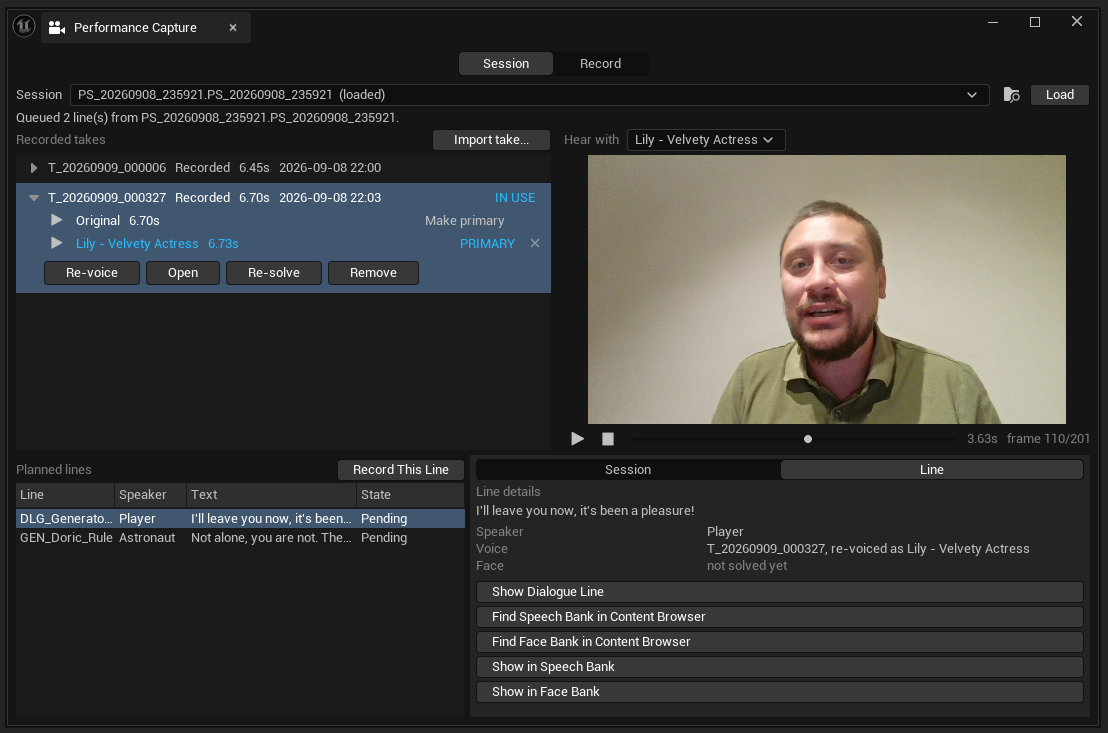
Read the transport: 3.63s frame 110/201. The review pane plays the
take's own frames on their own measured timing, counted rather than
interpolated from a nominal frame rate — which is what
the manifest
exists to make possible.
The two pages list takes from different places, and the ids show it. The
Session page's Recorded takes are T_20260909_000327; the Record page's
Takes are folders like PF_Player_DLG_GeneratorBriefing_Player_IllLeaveYouNow_20260909_000321.
They are not the same list. The Record page lists the capture library on disk — folders this panel wrote. The Session page asks SpeechForge for the line's take ledger, by reflection, and comes back empty without it.
That split is the design stated in the session asset's own header: take truth lives on the speech lines themselves; this asset is the plan and the fixtures, not a second copy of the takes. It is also why your takes survive not paying for this plugin.
Face reads not solved yet in that capture even though the voice is
settled. That is the state the Line tab exists to surface: a take chosen
and re-voiced, with no face solved from the audio that resulted. It is not an
error — it is work outstanding, and it is legible at a glance instead of
being discovered when the mouth does not move.
Above all four sits the session picker: every PS_ asset, with the loaded one
marked (loaded) in blue in the list as well as in the closed box —
because picking from a column of near-identical date-stamped names with no
indication of which is already open is how the wrong session gets loaded over
the right one. Choosing one loads it; Load re-loads it; the folder icon
shows it in the Content Browser.
A take is a folder, and the voices live inside it
This is the part that is easiest to miss. A take row expands, and under it sits one row per voice that take can be heard in:
| Row | What it is |
|---|---|
| Original | The take's own recording. Always first, and it is the take — it cannot be dropped |
| Any others | Re-voicings of that same performance, added by Re-voice |
In the capture above that reads: the performer's own 6.70s recording, and Lily - Velvety Actress at 6.73s — the same delivery in the line's cast voice, 30 milliseconds longer, which is the conversion preserving pacing rather than re-speaking the words.
Each voice row carries four controls, and the split between them is the whole design:
| Control | What it does |
|---|---|
| ▶ | "Hear this. Listening decides nothing." |
| Make primary | "Make this the take's primary voice — the one that goes into the speech bank, and that the face is solved from, when this take is in use." |
| PRIMARY | Shown instead of the button on the voice that already is |
| ✕ | "Drop this voice from the take. Its audio asset stays in the project." Hidden on Original |
Preview and decision are deliberately different controls. Listening to a voice must never change which one the line uses — otherwise comparing two of them silently rewrites the answer.
The same reasoning gives the review pane its own Hear with picker: which voice plays over the picture is a question about listening, not about the take. Having to promote a voice in order to hear it made comparing impossible without changing the result.
PRIMARY is about the voice; IN USE is about the take. They are two different decisions, and calling both "in use" made them look like one.
What you can do to a take
| Button | What it does |
|---|---|
| Use this take | "Make this take the line's — its voice into the speech bank, and its face re-solved from that same audio so the two cannot disagree." |
| Re-voice | "Re-voice this performance into the line's cast voice, keeping the delivery. Another voice for this take, not another take. Billed by its duration." |
| Re-solve | "Run the finishing pass again for this take — the face solved from its current voice, merged and baked. Nothing is re-voiced and nothing is charged for." |
| Open | The take's folder — the video side lives there |
| Remove | Deletes the take and its folder: the video, the recording, the manifest. Refused while the line is playing its audio |
| Import take… | "Bring an existing recording in as a take — an actor's studio WAV… It is copied into the capture library, so the take is self-contained." |
Re-voice and Re-solve look alike and one of them costs money. Re-voice sends audio to a provider and is billed by duration. Re-solve runs the local face solve again and is free. If a mouth is wrong, Re-solve is almost always the one you want.
Two warnings the list can show
Save Takes is off — the list is off, not empty. Without saying so it reads as a broken panel, and the takes recorded while it was off are genuinely not there, because they were never written down.
The line is playing audio that is not from any take listed here — a latest-wins recording, or something made in the Speech Library. Saying so is the honest alternative to letting some older take keep the badge and imply otherwise.
Line details
The Line tab answers everything about the selected line in one place, and one of its three facts is the point of the whole take model:
| Fact | Values |
|---|---|
| Speaker | From the line |
| Voice | Which take and voice it is using |
| Face | this session has no face bank / not solved yet / solved from the voice in use / OUT OF STEP — solved from other audio; use a take to re-solve it |
A face is solved from audio. If the clip's audio is not what the line plays, the mouth is shaped for a voice nobody will hear — the same failure as a drifted subtitle, and just as invisible. This line is the one that catches it.
Under the facts sit four navigations, one to each stage the line touches: Show Dialogue Line (the script it was harvested from), Find Speech Bank in Content Browser, Find Face Bank in Content Browser, Show in Speech Bank and Show in Face Bank.
Record This Line points the teleprompter at the selected planned line and switches to Record — which is how a director jumps from reviewing to a pickup without rebuilding the session.
Playback
Playback decodes frames one at a time into a single reused texture, on their own measured timing, with audio. That is a deliberate constraint against cache pressure — a take of a few hundred 720p JPEGs would otherwise be hundreds of megabytes of textures.
Generate Take
Adds a detached synthesis candidate to a line's ledger without touching the line.
That is the quietly important one. It means a director reviewing four recorded takes can put a synthesised option beside them, compare, and choose — without the act of generating having already changed what the game plays.
A candidate that is not chosen changes nothing. That is keep options, make choices visible as a concrete mechanism rather than a slogan.
Take folders
Forge/Library/Performance/Takes/PF_<slate>_<stamp>/Inside: the WAV master, the JPEG frames named by media-clock ticks, and
take_manifest.json written last.
The manifest being written last is the completeness protocol. A take folder without one is an interrupted recording, and nothing downstream has to guess.
The slate is the line id, so a folder name carries its whole provenance:
PF_Player_DLG_GeneratorBriefing_Player_IllLeaveYouNow_20260909_000321
   └ speaker  └ line id                             └ when
That is why the ledger can list three takes of two lines and say which is which without a database.
Session assets
PS_ assets have a factory, so double-clicking one opens the capture panel
on that session rather than a generic details view.
Small thing; it is the difference between a session being a document you work in and a struct you inspect.
Settings
| Where | What |
|---|---|
| Editor Preferences ▸ Automation Forge ▸ PerformanceForge Devices | The device choice — per user, per machine |
| Project Settings ▸ Automation Forge ▸ PerformanceForge | The take folder path |
Device choice being per-machine rather than per-project is the correct tier: your microphone is not a property of the game.