Concepts
Banks, lines, handles, and the Speech Library.
The assets
Four asset types, all made the same way: Content Browser ▸ right-click ▸ Automation Forge ▸ SpeechForge.
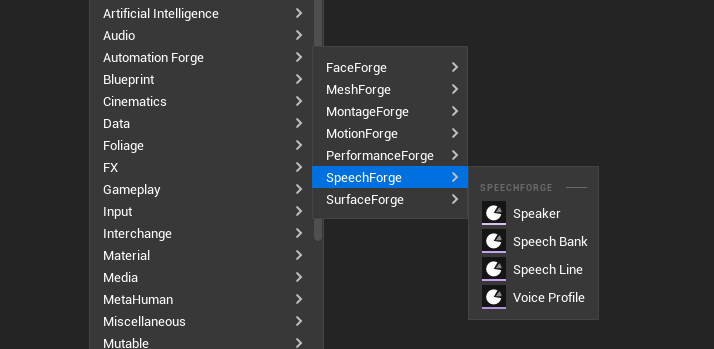
| Asset | What it is |
|---|---|
Speech Bank (SB_) | Many lines, one scene |
| Speech Line | A single line as its own asset |
Speaker (SP_) | Who is speaking — see casting |
Voice Profile (VP_) | One voice on one provider, reusable |
Two asset shapes, one interface
A Speech Bank holds many lines. A single-line asset holds one. Both sit behind the same interface and are addressed by every tool through one handle type.
That means a tool never has to ask which shape it is looking at, and a project can start with loose lines and consolidate later without rewriting anything.
A line id is the naming scheme
The line id is the join. The staleness hash, the dialogue node lookup, the source-to-translation pairing and the runtime's "same line, other culture" lookup all key off it.
Generated ids are the naming scheme, not a placeholder. If you rename ids to something more readable after generating, the audio that was filed under the old id is orphaned — and a subsequent generation writes over whatever now holds the new one. Decide the id scheme before you generate at volume.
The Speech Library
Tools ▸ Speech Library, under the menu's Automation Forge heading — six pages behind one switcher:
| Page | What it is for |
|---|---|
| Ingest | Bring lines in from somewhere else |
| Cast | Speakers and voice profiles — see casting |
| Write | The lines: text, direction, speaker, per-line voice override |
| Produce | The pipeline table, the estimate, and Generate |
| Perform | Carrying generated audio onward |
| Localize | A sibling bank per language — see localisation |
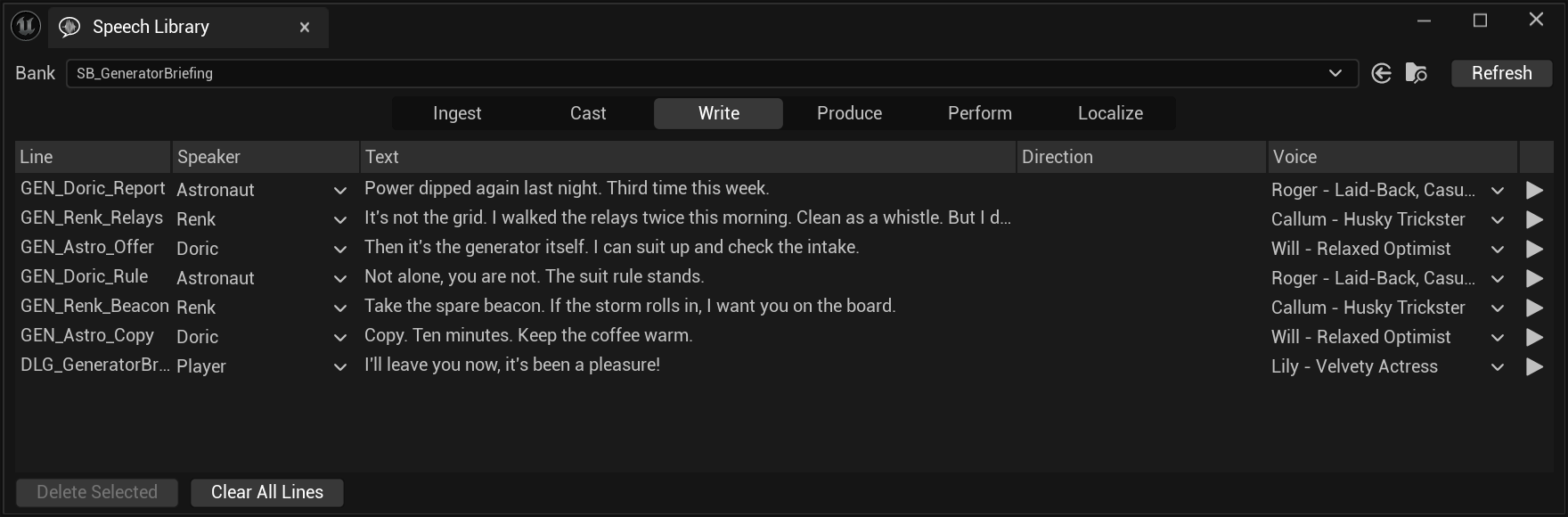
The bank picker at the top is the only global state. Every page below it is about the bank named there — which is why switching to a localised sibling changes what the pages offer rather than opening a second window.
The Write page's line editor
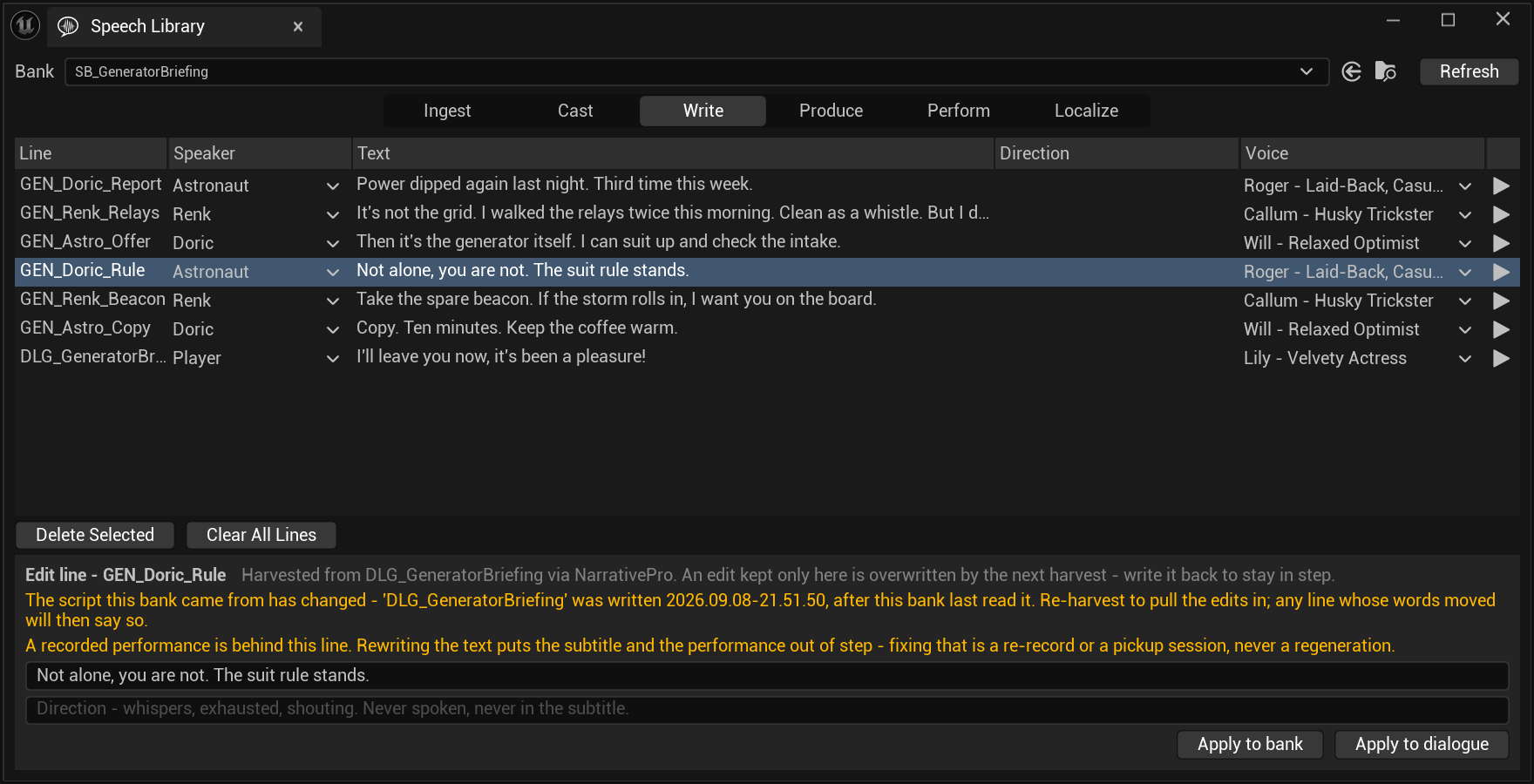
Selecting a line opens an editor under the table. It is where a line's text and direction are changed, and it is where the pipeline does its shouting.
| Field | What it is |
|---|---|
| Text | "What the player reads and what is spoken." |
| Direction | "Direction — whispers, exhausted, shouting. Never spoken, never in the subtitle." |
| Apply to bank | "Save onto the bank line. Changed text reads as stale in Produce — a priced report, never a silent regeneration." |
| Apply to dialogue | The write-back, when the bank has a source that supports one |
The loud warning is the one about a recorded line. A generated line going stale is a re-read for a fraction of a cent. A recorded line going stale means the subtitle and a human performance now disagree, and the only fixes are a re-record or a pickup session.
That difference is shouted before the edit rather than reported after it. Once the text has moved, the panel escalates to "OUT OF STEP: this text no longer matches the recorded performance behind it. Regeneration will not touch a recorded line — re-record it or book a pickup."
"An edit kept only here is overwritten by the next harvest." A bank that reads from a dialogue is downstream of it. Apply to dialogue is the other half of the contract — it pushes the change back up, so the next harvest agrees with you instead of undoing you.
Sibling plugins add buttons without editing this
The pages have a reflection-based discovery seam. A sibling plugin marks a function with the right metadata and its button appears — no edit to SpeechForge, no dependency in either direction.
That is how the face and performance sets put their own actions on the Perform page — and how a dialogue framework puts Apply Voice and Faces to Dialogue there without SpeechForge knowing what a dialogue is.
There are three kinds of tag, and they land in different places:
| Tag on a toolset function | Becomes |
|---|---|
SpeechLibraryAction = "Label" | A button, on the page named by SpeechLibraryPage |
SpeechIngest = "Label" | An ingest method, with the asset class it reads |
SpeechLineSync = "Label" | A write-back button in the line editor, shown only on banks whose source stamp carries that adapter's key |
In the project these captures come from, every button below is contributed:
| Button | Page | From |
|---|---|---|
| Harvest from Dialogue | Ingest | the Narrative Pro adapter |
| Harvest Characters… | Ingest | the Narrative Pro adapter |
| Re-harvest from Dialogue | Ingest | the Narrative Pro adapter |
| Apply to dialogue | the line editor | the Narrative Pro adapter |
| Apply Voice to Dialogue | Perform | the Narrative Pro adapter |
| Apply Voice and Faces to Dialogue | Perform | the Narrative Pro adapter |
| Create/Update Face Bank | Perform | FaceForgeToolset |
| Record Selected… | Perform | PerformanceForgeToolset |
| Plan Session… | Perform | PerformanceForgeToolset |
The Ingest page exists exactly when at least one ingest method is found. It is not a page that can be empty — a project with no adapter installed does not have one, and the Library opens on Cast instead.
The Perform page is the seam made visible: almost every button on it arrived from a different plugin, and a project missing one simply sees fewer.
Console commands
There are no in-editor buttons on the settings page, because
CallInEditor buttons do not render on a developer-settings page — a real
engine limitation, not an oversight. So:
SpeechForge.CredentialStatus   # is a key available, and where is it read from
SpeechForge.TestConnection     # one cheap authenticated call; reports tier and remaining credits
SpeechForge.ClearKey           # forget the stored key
TestConnection reporting remaining credits rather than just validity is
the useful part. "Your key works" and "you can afford this batch" are
different facts.
Keys
Declared in the plugin's machine configuration and read from the OS credential vault — shared with the hub and the plugin's own settings page, so a key set in any of them is set for all.
See keys.
Takes
A generated result is a take. Takes are kept, and a provider that supports it can re-fetch a past take from account history for free rather than re-synthesising it.
That matters more than it sounds on a metered provider: recovering a take you already paid for should not cost again.