Real-world terrain
Pick a square of the Earth on the map, see which sources cover it, and import its elevation, land cover and OpenStreetMap features into a Terrain Definition.
The GIS import tab of the TerrainForge editor starts a terrain from a real place. You choose a square on a map, Discover asks the data providers what they hold for it, and Import brings the elevation and the masks you ticked into the definition's graph.
All of it runs inside the editor. It needs internet access to the providers, and nothing else: no account, no key, no other program.
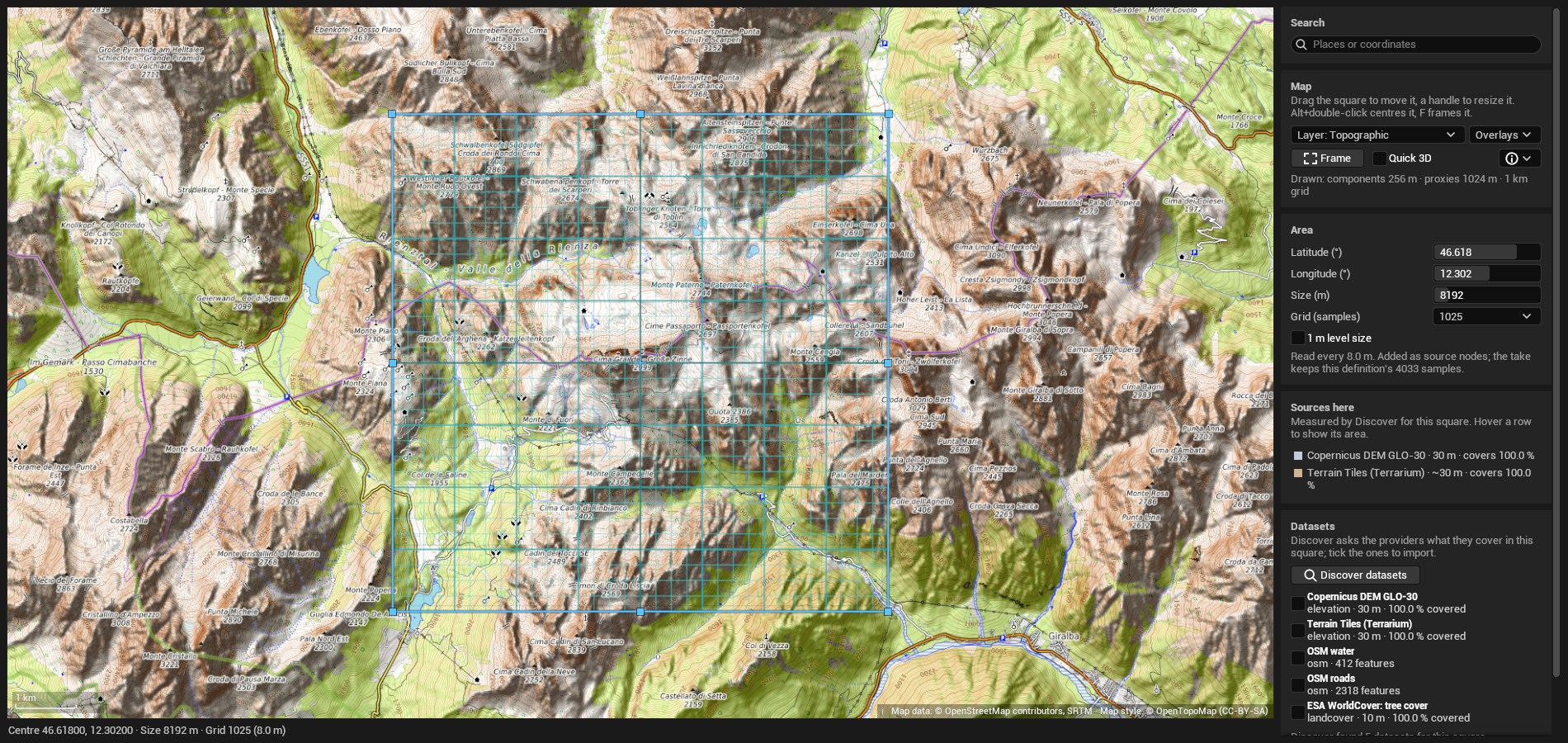
The map
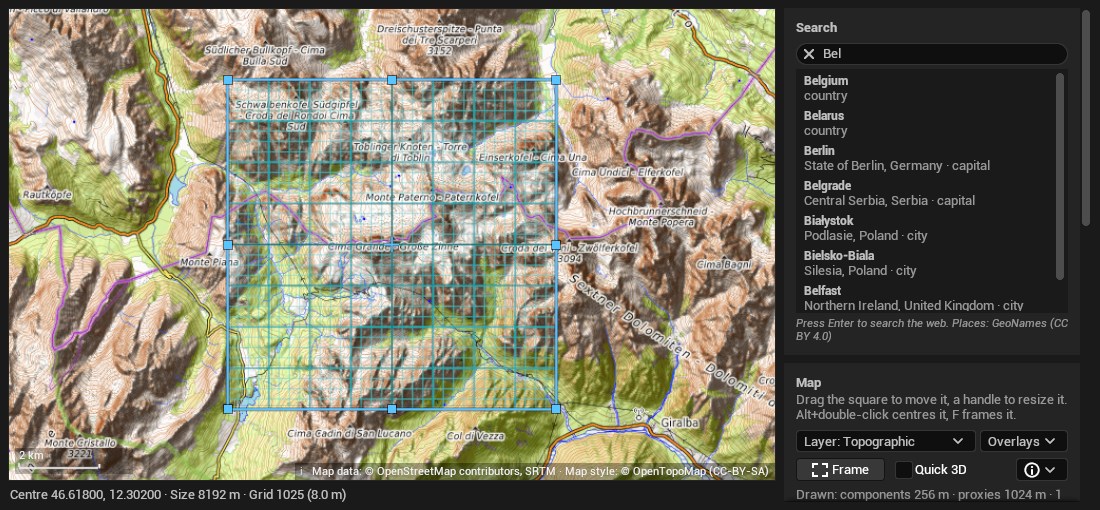
- Search. Type a place for suggestions from an offline list of towns and places (GeoNames, CC BY 4.0), or paste coordinates in decimal or degrees-minutes-seconds, or an OpenStreetMap or Google Maps link. Enter asks a web search (Photon, with Nominatim as fallback, or a keyed service set in the map settings).
- The square. Drag it to move it and a handle to resize it; Alt+double-click centres it, F frames it. Its centre must be within 80° of the equator. Its side is 500 m to 50 km.
- Grid. The samples per side the sources are read at: 257, 513, 1025, 2017, 2049 or 4033. "A finer grid does not improve the source's own resolution."
- 1 m level size snaps the square to 2016 or 4032 m on a 2017 or 4033 grid, the shape a level project uses.
- Overlays draw a 1 km grid, the landscape components and streaming proxies the import will create, the open level's World Partition cells (approximate), and the area each elevation source covers.
- Relief shading puts a hillshade over the basemap and reads the elevation under the cursor.
- Quick 3D shows the square in the Terrain viewer from 30 m elevation tiles, and follows the square as it moves. "It is not the import."
Basemaps are for looking, not importing. "Basemap tiles are for display only. They are never written into a take, a texture, provenance or an export; only the sources you import carry licences into the project." The default is OpenTopoMap; OpenStreetMap and a relief layer need no key; Esri World Imagery, MapTiler, Stadia, Thunderforest and Mapbox layers appear when you enter their keys in Editor Preferences → Plugins → TerrainForge Map. Each layer shows its own attribution on the map.
Discover
Discover datasets asks the providers what they cover in the square. It takes 10 to 40 seconds and imports nothing. Use this area discovers first when the square has moved, then imports what is ticked.
Elevation, ranked
Every source whose coverage area reaches the square is probed on a 48 × 48 grid, and listed with its resolution and the share of the square it covers. They are ranked in this order:
- sources that allow commercial use before any that do not;
- national and global surveys before the last-resort web tiles;
- finer resolution first;
- more coverage first.
Rank 1 is marked recommended. Above the individual sources sits Elevation · best available: every ranked source in that order, the finest first, each one filling the voids of the one before, with the web tiles last. Choose it unless you have a reason to force one source.
A source that fails is still listed, with the reason: the provider's error, or "No answer within 25 s." A source whose area does not reach the square is left out. One failing provider never fails Discover.
Land cover and OpenStreetMap
Discover also reads the ESA WorldCover classes present in the square, with each class's share, and counts the OpenStreetMap features of each dataset.
A dataset with no features is unmapped, not absent: "Mapped observations; incomplete OSM coverage is not evidence of absence."
Elevation sources
Read from the plugin's Resources/GIS/sources.json, in the order ties are
broken:
| Source | Covers | Resolution | Kind | Licence | Credit required |
|---|---|---|---|---|---|
| IGN LiDAR HD MNT | Metropolitan France; national coverage is still being completed | 0.5 m | Bare earth, airborne LiDAR | Licence Ouverte 2.0 (Etalab) | Yes |
| IGN RGE ALTI | All of France; coarser photogrammetry, up to 5 m, in parts of the mountains | 1 m | Bare earth | Licence Ouverte 2.0 (Etalab) | Yes |
| swisstopo swissALTI3D | Switzerland and Liechtenstein; newest survey per 1 km tile | 0.5 m | Bare earth | swisstopo Open Government Data | Yes |
| USGS 3DEP | The United States: the lower 48, Alaska, the Aleutians, Hawaii, Puerto Rico, Guam and the Northern Marianas, American Samoa | 1 m lidar where flown, about 10 m elsewhere | Bare earth | Public domain | No (good practice) |
| Kartverket DTM | Norway | 1 m | Bare earth | CC BY 4.0 | Yes |
| AHN DTM | The Netherlands; buildings and water are voids by design, filled from the next source | 0.5 m | Bare earth, LiDAR | CC0 1.0 | No (good practice) |
| Environment Agency LIDAR Composite DTM | England | 1 m | Bare earth, LiDAR | Open Government Licence v3.0 | Yes |
| Geobasis NRW DGM1 | North Rhine-Westphalia, Germany | 1 m | Bare earth, LiDAR | dl-de/zero-2.0 | No (good practice) |
| Copernicus DEM GLO-30 | Worldwide, land only | 30 m | Surface: includes forest canopy and buildings | Copernicus DEM licence | Yes |
| Terrain Tiles (Terrarium) | Worldwide, within 80° latitude; last resort | about 30 m | Mixed sources | Mixed open sources, listed in terrain-attribution.txt | Yes |
Every listed source allows commercial use.
Copernicus is not bare earth. It is a surface model: forest canopy reads as raised ground, and a town as blocks. Where a national bare-earth survey covers the square, it ranks above Copernicus.
- Datum accuracy. Elevation and OpenStreetMap are aligned to about 1 m, and to about 2 m in Great Britain, where the national grid-shift files are not used. Masks can sit that far off the terrain.
- Where a service answers with zeros or an error outside its survey (Norway, England), those samples count as voids, not as sea level.
- A forced single source that does not cover the whole square says so: "… cover only x % of the square. Choose "elevation" (best available) to fill the rest from other sources."
- Voids left after every source are filled from the nearest measured sample, and the import notes how many: "… void pixels (…) were filled from the nearest measured sample."
Land cover
ESA WorldCover 2021, 10 m, worldwide, CC BY 4.0 (credit required). Ten classes, each importable as its own mask:
| Dataset id | Class |
|---|---|
worldcover:trees | Tree cover |
worldcover:shrubland | Shrubland |
worldcover:grassland | Grassland |
worldcover:cropland | Cropland |
worldcover:built | Built-up |
worldcover:bare | Bare / sparse vegetation |
worldcover:snow | Snow and ice |
worldcover:water | Permanent water bodies |
worldcover:wetland | Herbaceous wetland and mangroves |
worldcover:moss | Moss and lichen |
Each class becomes a soft 0 to 1 mask, interpolated onto the grid and stored as an 8-bit image. It is a 10 m classification: a fine edge on the map is a 10 m step in the mask.
OpenStreetMap features
Fetched through the Overpass API. Each dataset becomes a mask, and the features themselves are kept as vectors.
| Dataset id | What it holds |
|---|---|
water | Mapped water (lakes and rivers) |
lakes | Mapped lakes and ponds |
rivers | Mapped rivers and streams |
forest | Mapped woodland |
grassland | Mapped grassland and meadows |
wetland | Mapped wetland |
glacier | Mapped glaciers |
scree | Mapped scree |
bare_rock | Mapped bare rock |
shingle | Mapped shingle |
cliffs | Mapped cliffs (buffered lines) |
roads | Mapped roads |
paths | Mapped paths and tracks |
buildings | Mapped buildings |
- Lines are painted at a width. Roads, paths, rivers and water use the
feature's
widthtag when it is a sensible number. Otherwise roads are 6 m, paths 2 m, cliffs 6 m and the rest 4 m, and the import says so: "Line masks use approximate width where OSM has no width tag; vectors preserve the original centreline." - A river is never a lake. A water area tagged as a river, stream, canal, ditch, drain or rapids counts as a river, in the masks, in the site check and in a level build.
- Masks are 0 or 255. They do not carve the terrain by themselves; your graph decides what they do.
Import
Tick the datasets, then Import ticked (or Use this area). One switch decides what happens to the definition:
| Replace graph and world settings | Result |
|---|---|
| On | The graph and world settings are replaced. The elevation arrives as an Imported heightfield node in metres, wired to the output, and water is off. The world's height range is set from the data with a metre to spare. |
| Off | The sources are added as nodes to the existing graph, which must have the same physical size as the square. Nothing is aligned automatically. |
Every mask arrives as an Imported mask node named gis_<dataset>, exported
as a named map GIS_<dataset> and left unwired. Without an elevation dataset,
a replacing import starts from a flat placeholder.
The import is one undoable step. If the definition changes while the import
runs, the result is not applied over your edits: the import fails, keeps the
downloaded project in Saved/TerrainForge/gis-imports/, and names the file.
Resolutions
The grid sets how often the sources are sampled. With Replace on, it also sets the take's resolution:
| GIS grid | Take built at |
|---|---|
| 257 | 505 |
| 513 | 1009 |
| 1025 | 2017 |
| 2017 | 2017 |
| 2049 | 4033 |
| 4033 | 4033 |
With Replace off, the take keeps the definition's own resolution.
Limits
- At most 15 mask datasets in one import: "a graph holds 16 source files."
- At most 16 sources and 96 MiB of embedded data in the definition, and a portable project of at most 144 MiB.
- One import or level build at a time across the editor.
- A 4033 import needs about 1.2 GB of free memory. It stops rather than page when more than 85 % of the computer's memory is in use.
- An import reports its progress on the GIS tab and in the build monitor; Cancel import stops it.
With the data downloaded, a 4033 import of an alpine square with two land-cover and ten OpenStreetMap masks takes 2 to 3 seconds. The download usually takes longer, and depends on the providers and your connection.
What is cached
| What | Where | For how long |
|---|---|---|
| Discover results | Memory | 10 minutes per square |
| Site-check results | Memory | 15 minutes per square and profile |
| Web elevation tiles (Terrarium) | Saved/TerrainForge/GIS/terrarium | Until the cache limit (2 GiB by default); least recently used go first |
| Map tiles | Saved/TerrainForge/MapTiles | Up to the disk budget (1 GB by default) |
| Import records | Saved/TerrainForge/gis-imports | The newest 20, at most 30 days |
Elevation from the national services, land cover and OpenStreetMap are not cached on disk. A second import of the same square downloads them again.
Clear GIS caches in Editor Preferences → Plugins → TerrainForge GIS
(or the console command TerrainForge.GIS.ClearCaches) deletes the tiles on
disk and the results in memory.
Attribution and licences
Every import and level build records, for each dataset, its source, its licence and its attribution in the definition's GIS provenance. An export copies it into the export bundle. Use it to credit the data owners when you ship.
- Credit is required for IGN, swisstopo, Kartverket, the Environment
Agency, Copernicus DEM, ESA WorldCover, Terrain Tiles (the list in
Resources/GIS/terrain-attribution.txt) and OpenStreetMap. - No credit is required for USGS 3DEP (public domain), AHN (CC0) and Geobasis NRW (dl-de/zero-2.0). Giving it is good practice.
- OpenStreetMap data is © OpenStreetMap contributors, under the Open Database Licence (ODbL) 1.0. Masks and terrain made from it carry the credit "© OpenStreetMap contributors".
The OpenStreetMap vectors are a database
An export can write the imported OpenStreetMap features as
gis_vectors.geojson. That file is a database derived from OpenStreetMap.
If you ship it, or a database made from it, you must offer it under the ODbL.
TerrainForge writes the notice and the attribution beside it, in a file with
the same name ending in .ODbL.txt. Keep the two together. If the notice
cannot be written, the export stops and says "The vectors may only be shared
with it (ODbL)".
The masks are a different case: an image made from the data is a produced work, which needs the credit, not the licence.
Internet access
TerrainForge contacts these servers only when you use the map or the GIS features:
| Data | Provider | Server |
|---|---|---|
| Elevation, France | IGN Géoplateforme | data.geopf.fr |
| Elevation, Switzerland | swisstopo | data.geo.admin.ch |
| Elevation, United States | USGS 3DEP | elevation.nationalmap.gov |
| Elevation, Norway | Kartverket | wcs.geonorge.no |
| Elevation, Netherlands | AHN (PDOK) | service.pdok.nl |
| Elevation, England | Environment Agency | environment.data.gov.uk |
| Elevation, North Rhine-Westphalia | Geobasis NRW | www.wcs.nrw.de |
| Elevation, worldwide | Copernicus DEM GLO-30 | copernicus-dem-30m.s3.amazonaws.com |
| Elevation, worldwide | Terrain Tiles | s3.amazonaws.com |
| Land cover, worldwide | ESA WorldCover | esa-worldcover.s3.eu-central-1.amazonaws.com |
| OpenStreetMap features | Overpass API | overpass-api.de, or the servers you set |
The map adds its basemap's tile server and, when you press Enter in search, the place-search service. Requests carry the square's coordinates and nothing else from your project: no account, and no key except a map key you entered for that provider.
Requests are polite by design:
- At most four at a time to one server, and one at a time to Overpass.
- A server that answers busy (429, 502, 503 or 504) is waited for and retried, honouring its own Retry-After.
- GIS requests go only to the servers above. A redirect to another host is refused: "… redirected the request to another host."
When the public OpenStreetMap server is busy
The Overpass server at overpass-api.de is shared by everyone and is often
busy. When it gives up, TerrainForge says so in plain words:
The public OpenStreetMap server (overpass-api.de) is busy; try again in a few minutes, or add another Overpass server in Editor Preferences > TerrainForge GIS.
Add servers under Overpass endpoints in Editor Preferences → Plugins → TerrainForge GIS. They are tried in order. When one is busy and the next answers, the import notes it; when all of them are busy, the import stops:
OpenStreetMap (Overpass) is busy on every configured endpoint (…). Wait a minute and import again.
For heavy use, point it at an Overpass server of your own.