Concepts
Face banks, clips, layers and the preview stage.
Face banks and clips
A face bank holds clips. A clip is one line's facial animation: its audio, its solved curves (in layers), its status and origin, and what it bakes to.
Both are made from Content Browser ▸ right-click ▸ Automation Forge ▸ FaceForge, though in practice a bank is usually created for you from a selection of speech lines:
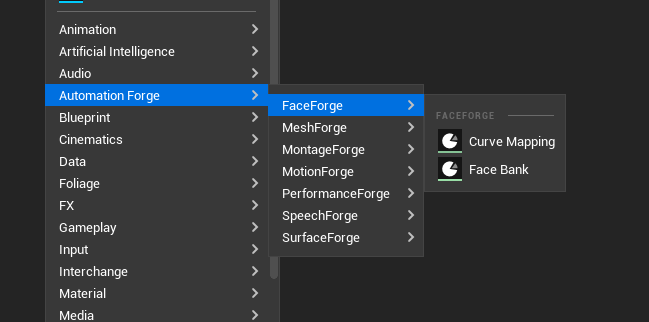
A face bank claims a speech bank, and the face bank's language is the language of the speech bank it claims — not a field of its own. Localised siblings are matched by language first and clip id second.
Layer operations
| Operation | What it does |
|---|---|
SolveFaceClipToLayer | Solve audio into a named layer |
SnapshotFaceSolveToLayer | Capture the current solve into a layer |
MergeFaceClipLayers | Apply the recipe — base plus overlays at their weights |
RemoveFaceClipLayer | Drop one |
The merge recipe is data on the clip, so a merge is repeatable and a weight is adjustable without re-solving anything.
Line-to-face lookups
Three questions FaceForge can answer because it owns the facts:
- What face montages are in this bank?
- What face montages serve this speech bank?
- What speech bank does this face bank claim?
They join on facts only FaceForge owns, which is why they live here rather than in whatever framework is playing the result.
The Face Bank panel
Tools ▸ Face Bank, under the menu's Automation Forge heading.
A clip list showing status, origin, layers and staleness, plus a live preview stage with solve, merge and bake controls and an orbit-or-free camera.
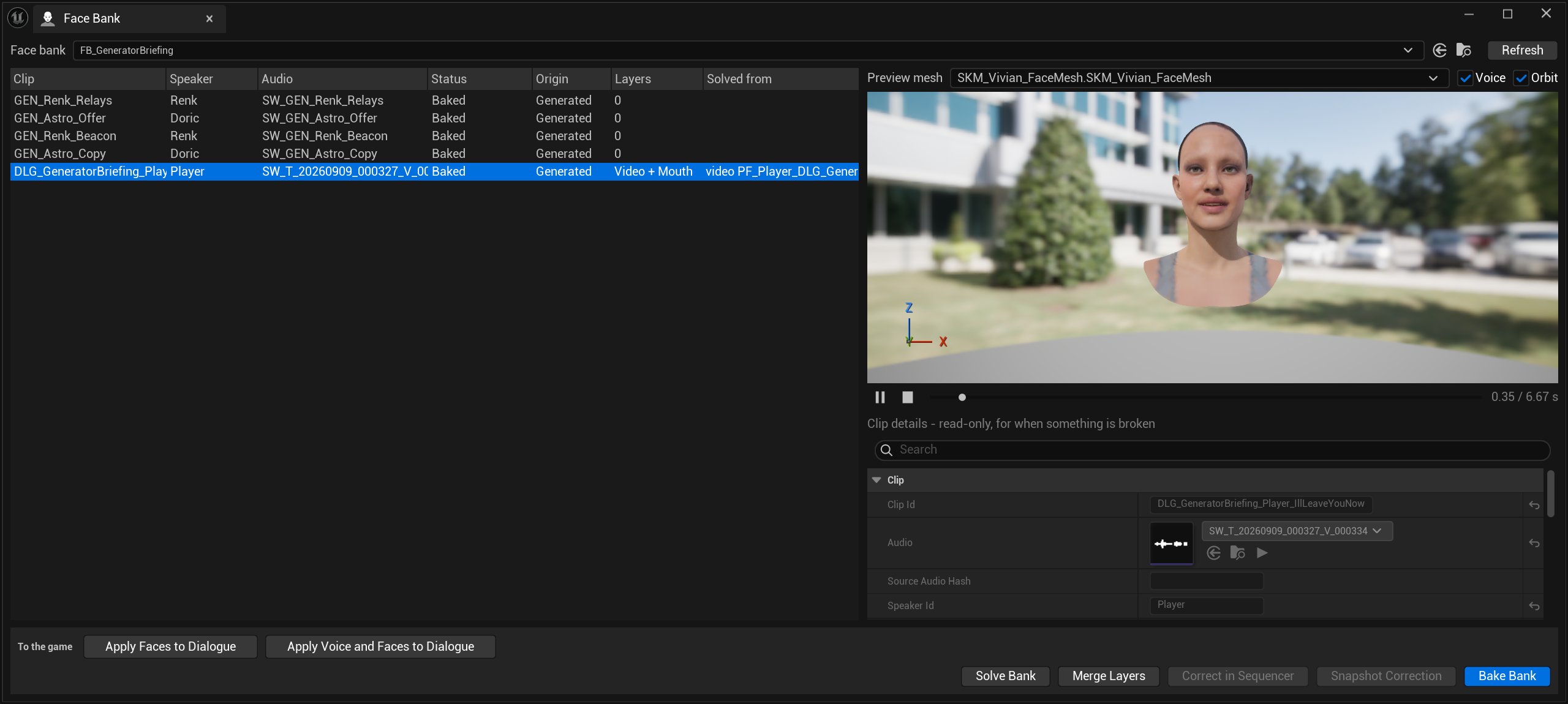
The preview mesh follows the selected clip, not the bank. Selecting a different speaker's line swaps the head on the stage, so you are looking at the character who says that line rather than at a generic one.
Where it gets the head from: the speaker's
sheet names a Face Mesh,
and this bank names none of its own. In this scene Renk's clips preview on
SKM_MH_Demo_Person_1_FaceMesh, which is exactly what SP_Renk names. The
player's sheet names no face mesh at all and the panel still finds one, so
there is a fallback here that this page does not describe.
Every control on it
| Control | What it does |
|---|---|
| Face bank | The bank. The arrow and folder icons open and locate the asset |
| Preview mesh | Which head the stage draws. Follows the selected clip |
| Voice | "Play the clip's audio with the face, so lipsync is judged as lipsync. Silent when the clip has no audio linked." |
| Orbit | "Orbit the face: left drag turns, wheel zooms, right drag dollies. Off, the viewport uses the ordinary Unreal camera." |
| ⏸ / ■ / scrub | "Stop, back to the first frame." Scrubbing pauses playback and resumes where you let go |
| Clip details | Read-only. "for when something is broken" |
| Solve Bank | "Solve every clip that needs it. Minutes; clips run one at a time." |
| Merge Layers | "Re-merge the selected clips' layers. Milliseconds; nothing re-solves." |
| Correct in Sequencer | Opens the hand-correction round trip. Needs the board vocabulary |
| Snapshot Correction | "Read the hand keys off the correction sequence into an additive 'Corrective' layer on the selected clip." Needs the board vocabulary |
| Bake Bank | "Bake solved curves to animations and montages. Milliseconds a clip." |
| To the game | Buttons a framework adapter contributed — here Apply Faces to Dialogue and Apply Voice and Faces to Dialogue |
Read the time units in those four tooltips as a map of the pipeline. Solve is minutes and runs one clip at a time; merge and bake are milliseconds. That asymmetry is why solving and baking are separate stages at all, and why re-baking the same solve onto a second character is nearly free.
A clip whose inputs have moved says so on hover: "The audio or solve settings changed after this clip was solved. Solve Bank brings it back in step."
What a clip actually holds
The details panel is read-only in the panel — these are set when the clip is made, or through the toolset — but it is the complete list of what a solve is a function of.
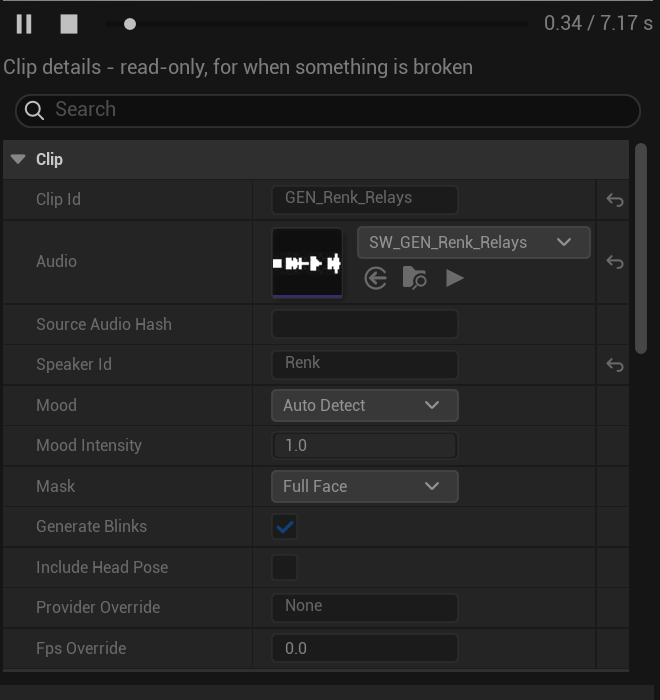
| Field | What it decides |
|---|---|
| Audio | The sound the face is solved from. The one fact that decides whether the face and the voice agree |
| Source Audio Hash | The content hash from whatever made the audio. Without it, a re-generated line of the same length is not recognised as changed, and the face silently stays in sync with audio that no longer exists |
| Mood | Auto Detect reads the mood out of the audio and is right far more often than a guess. Twelve named moods besides |
| Mood Intensity | 0 to 1 |
| Mask | Full Face invents an emotional performance from the audio. Mouth Only when something else already owns the expression |
| Generate Blinks | Whether the solver invents blinks rather than leaving the eyes static |
| Include Head Pose | Off by default on purpose. A solved head moves the neck, and so does any body montage on the same line |
| Provider Override | Which solver, for this clip |
| Fps Override | Sample rate for the curves. 30 is plenty for a face |
Mask is the field that causes arguments. A full-face solve invents an
emotional performance from the audio, which is usually what you want — but it
will fight an authored expression or a body montage that is already
carrying the emotion. Mouth Only is the answer when something else owns the
acting.
Turn Include Head Pose on for a line where the head is the performance, not as a matter of course. Two things driving the neck at once is a fight you will lose in Sequencer rather than here.
One bank is one character standard
A second character in the same scene means a second bank over the same audio — which costs a re-bake, not a re-solve.
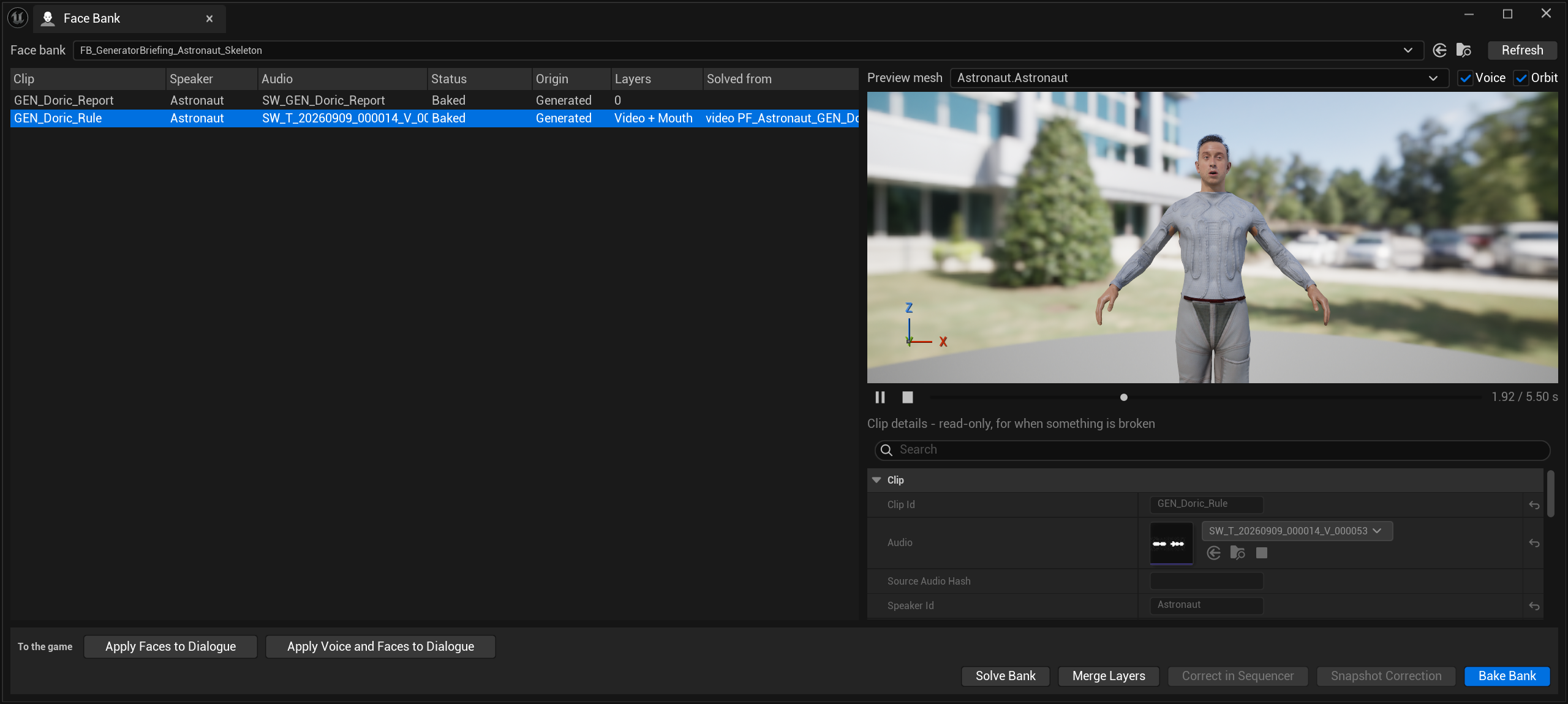
Correct in Sequencer is greyed out on this clip, and the reason is vocabulary, not character. Its tooltip says it plainly:
Open the selected clip on the face board in Sequencer: the solve on a base section, an additive section on top for hand keys. Re-running refreshes the base and keeps the keys. Needs a clip solved in the MetaHuman face-board vocabulary.
The other clip in this same Character Creator bank — solved from audio — can be corrected. This one cannot, because its curves came from a video solve in a different vocabulary. See vocabularies.
Sibling plugins add "to the game" buttons through a tagged discovery seam — no edit to FaceForge, no dependency either way. That is how a framework adapter puts its own export action on the panel.
Console
FaceForge.Providers       # list solvers, and say whether each is ready — and why not
FaceForge.ReleaseModels   # drop loaded models (~310 MB for the engine solver)
ReleaseModels is worth knowing about on a machine that is also running an
editor viewport and a container.
Lipsync is not shareable between takes
A solve belongs to the audio it was solved from. Two takes of the same line — even the same actor, same words, same day — do not share a solve, because the timing differs.
Copying a solve from one take to another produces a mouth that is subtly, consistently out. Re-solve per take. The solve is the slow part, but it is the part that has to be right.
Related and different: a solve is shareable between characters, because it is character-agnostic. Audio decides the solve; the character decides the bake.
Verify what is playing
When a face looks wrong in play, check that the asset in play is the one you edited. A bake writes a new animation and a montage; a montage that still points at the previous bake looks exactly like a solve that did not work.