Providers
Kimodo on your own GPU, Uthana hosted — what each gives you, what it costs, and where it stops.
Two routes today. They differ in more than price: one is reproducible and one is not, and that difference decides what a Motion Definition even means.
| Kimodo | Uthana | |
|---|---|---|
| Where it runs | Your machine, another machine on your network, or a GPU you rent | Uthana's service, on your own account |
| Cost | Free locally. Per hour on a rented GPU | Metered — per generated second, or per downloaded second on a subscription |
| Seed | Yes — a definition is a recipe | No |
| Native frame rate | 30 | 60 |
| Fingers | None. One fixed relaxed pose for the whole clip | Provided |
| Foot contacts | Baked from the model's own contact prediction | Not provided |
| Licence tier | Free, closed source | Open source |
Kimodo — local and reproducible
Runs NVIDIA's Kimodo model in Docker on hardware you control. Free to run locally, honours a seed, and therefore turns a Motion Definition into something that can be regenerated identically — which is not true of Uthana.
What it costs to run
Cost follows where it runs:
- This machine — free.
- Another machine on your network — free.
- A rented GPU — per hour at the price Runpod reported, billing while the pod is up whether or not anything is generating.
That last clause is the expensive one. A rented pod bills for existing, not for working. Stop it from the hub's Runners tab when you are done.
Generate starts a stopped runner
If the local runner is stopped, Generate starts it — Docker Desktop first if it is closed, then the container, then a wait for the text encoder — rather than refusing.
It never rents or starts anything that bills. Starting something free is a convenience; starting something metered would be a decision.
Speed depends on more than the GPU
Generation takes seconds to minutes depending on hardware. The honest version of that number: with the right precision setting it is around fourteen seconds; without it, five to seven minutes, because the prompt encoder is the slow part rather than the diffusion.
Both figures are true, and neither is true alone.
Settings, under Kimodo's own names
model (three checkpoints, chosen per request), seed (-1 picks a new one
per take and records it), diffusion_steps (100; 10–500), postprocess,
split_prompt_into_beats, and under Advanced cfg_type, cfg_text,
cfg_constraint, where poses come from, and the timeline's pose type.
Limits
- A beat is at most 10 seconds; a whole clip at most 60.
- No finger animation at all — the model has no finger joints, and hands are filled from one fixed relaxed pose for the entire clip. This is the single most important limitation of the provider.
- No prompt rewriter.
- Verified against the Narrative mannequin family. Other target skeletons are configurable but unverified.
Setup
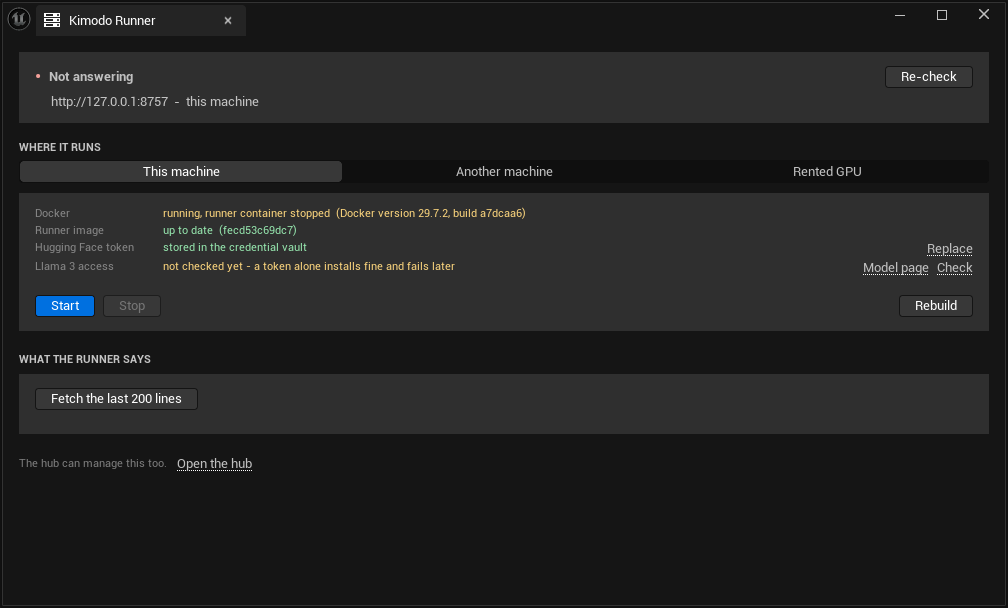
The Kimodo Runner panel — Tools ▸ Kimodo Runner, or
Kimodo.Panel — has three targets: This machine, Another machine, and
A rented GPU.
It manages the Docker lifecycle itself: install detection, starting Docker Desktop, compose up/start/stop/down, and image-signature drift detection that flags a rebuild as needed rather than leaving a mismatched runner silently wrong.
Setup steps are measured, not assumed: where it runs, Docker Desktop, the Hugging Face token, access to Llama 3, the runner image, the runner, and renting a GPU instead.
Both providers declare their setup the same way, so Get started can put them side by side and let you pick on evidence:
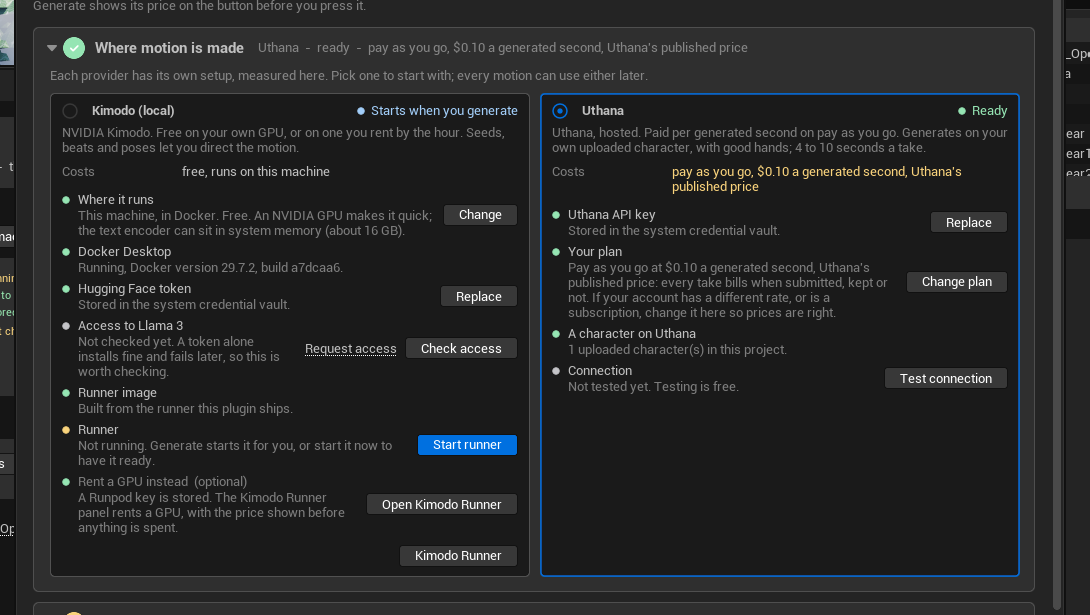
The cost line sits at the top of each card, before any of the setup. Kimodo reads "free, runs on this machine"; Uthana reads "pay as you go, $0.10 a generated second, Uthana's published price" — the published-price note appearing exactly where the choice between them is made.
Llama 3 access is measured too. Hugging Face is asked whether your stored
token can actually read the gated Meta-Llama-3-8B-Instruct model, and the
answer — granted, not granted, token refused, no token, unknown — is shown
with the link to request access.
A key that exists is not a key that works. Gated models need access, not just a token, and discovering that at generation time wastes a run.
Another machine — one GPU for the team
Point the project at a runner on somebody else's workstation. Nothing is installed or started on your machine, and your project pays for nothing.
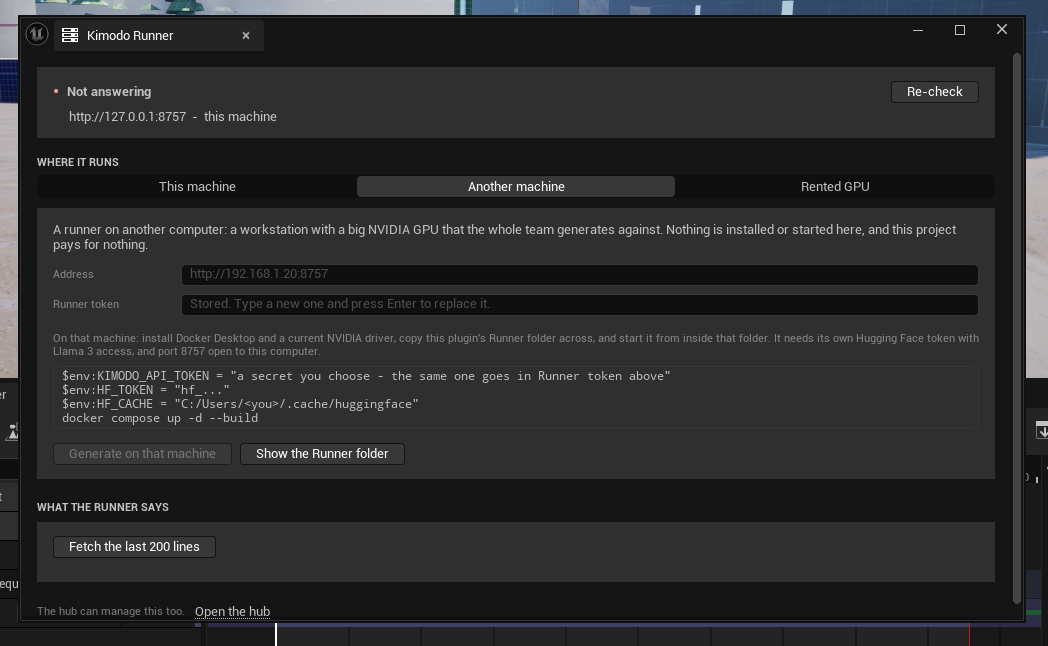
The token for that runner lives in this computer's vault, not in the project — so pointing at a shared workstation does not put its credential into source control.
Renting a GPU
Provision, start, stop, check and terminate a pod from inside the editor. GPU selection is ranked by real per-datacenter stock and a price ceiling (default $1.50/hr, 24 GB VRAM minimum).
Weights persist on a network volume, so a stopped pod restarts in roughly 76 seconds instead of a 15-minute rebuild.
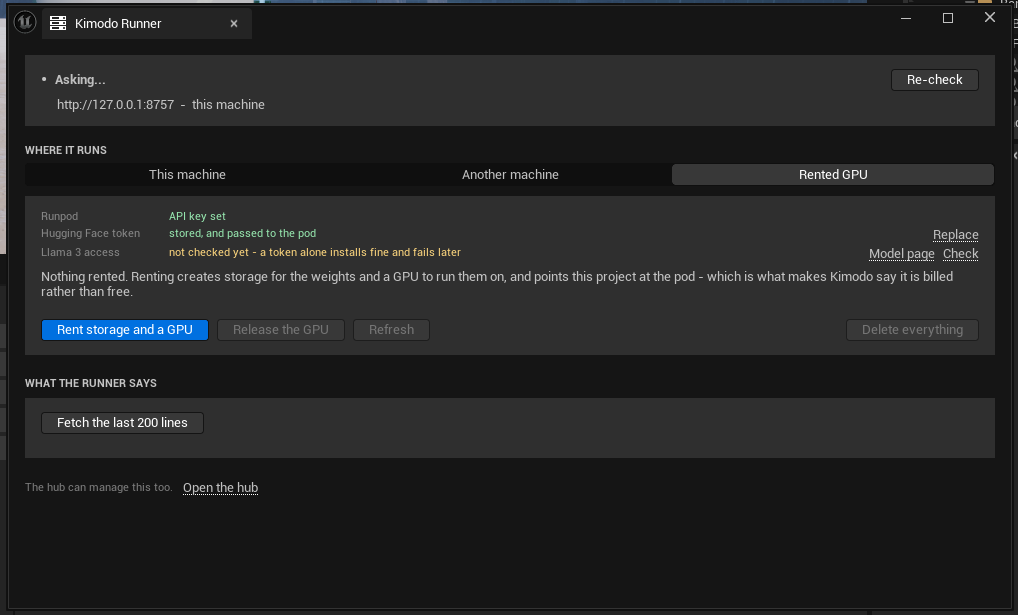
Storage and the GPU are two things, and only one of them stops. Release the GPU ends the hourly charge; the network volume holding the weights stays, which is what makes the next start take about 76 seconds instead of fifteen minutes. Delete everything is the one that removes the storage too.
Both are greyed out above because nothing is rented yet — the panel will not offer you a release for something that does not exist.
Note the middle row: the Hugging Face token is "stored, and passed to the pod". Your token travels to the rented machine, because the pod downloads the gated weights itself. That is also why Llama 3 access is checked here and not only on this machine.
Constraints — pinning a pose
Kimodo takes poses as generation constraints. You can:
- Capture a pose from the selected, posed actor (
Kimodo.CapturePose). - Author from an existing animation's frames (
Kimodo.AuthorPose). - Harvest from a Level Sequence's keyed rig — a transient, never-saved bake sampled only at keyed times.
- Drive a key from a reusable pose asset.
Plus list, clear, preview, measure and verify tools, so you can check what was authored before spending a generation.
23 console commands, all prefixed Kimodo..
Uthana — hosted
Hosted generation on your own Uthana account, with async jobs and per-character retargeting on the service side.
Only the asynchronous text-to-motion-3.0 model is implemented — declared as
4–10 seconds. The synchronous text-to-motion-2.0, which exposes seed,
cfg_scale and steps, is not.
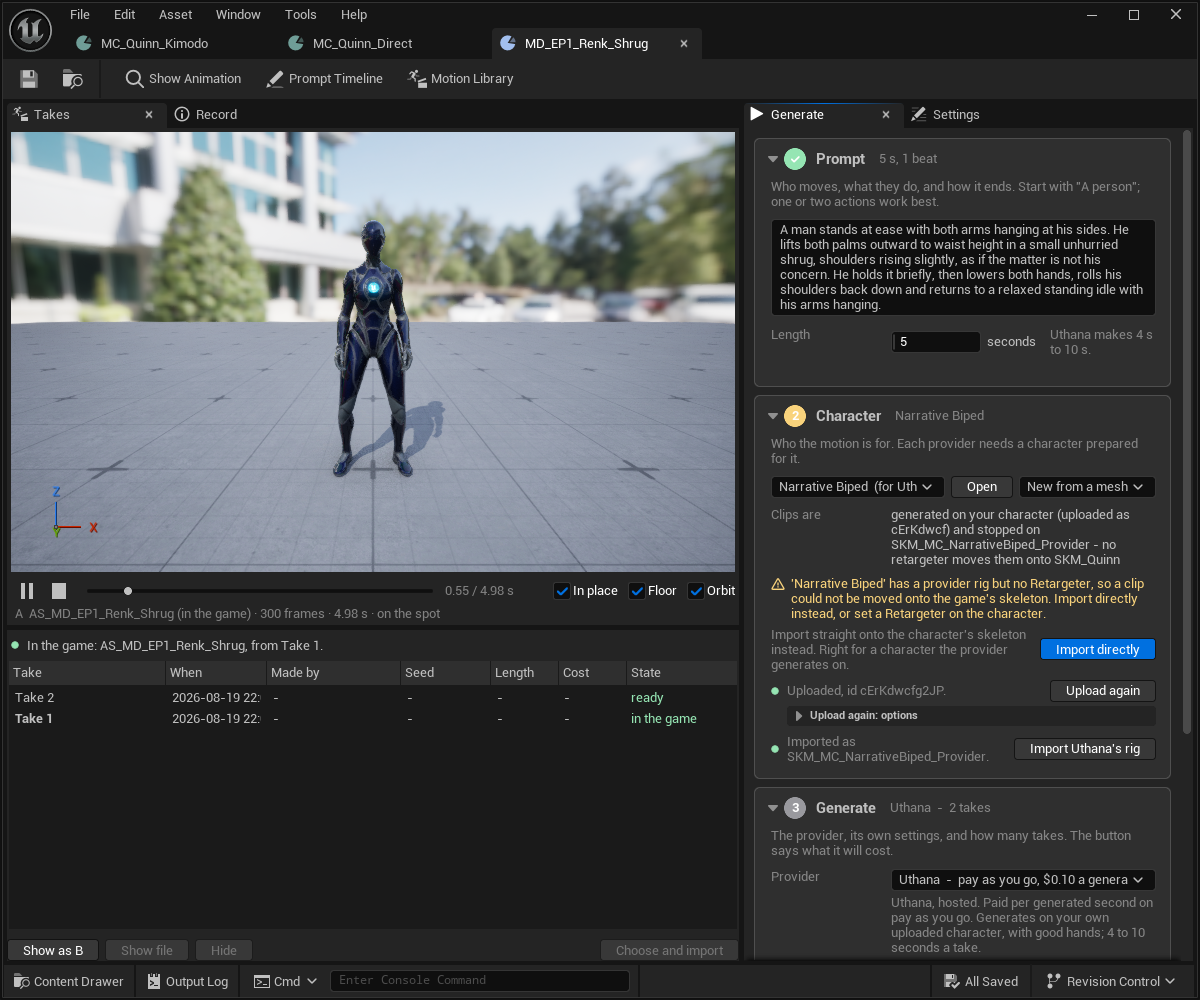
The amber block in that capture is the failure retargeting is about: "has a provider rig but no Retargeter, so a clip could not be moved onto the game's skeleton." It is raised on the definition, before a generation is paid for — not after one arrives on the wrong rig.
No seed, and what follows from it
Uthana's implemented model has no seed. Two consequences, both deliberate:
- MotionForge never prunes candidates for Uthana. A discarded take can never be regenerated, so its bytes are the only copy that will ever exist.
- A Uthana definition is a request, not a recipe. Re-running it gives you something new.
Billing, declared by the provider
- Pay as you go — bills per generated second, and fetching is free, so takes play in the editor before you choose.
- Subscription — bills per downloaded second, so the provider's viewer link is the free way to look, and an import says what quota it will use and asks first.
The rate starts at Uthana's published price ($0.10/s). While it is still that price, every cost line says so — "Uthana's published price; set your own on the MotionForge Uthana settings page."
That page is where you make the figures match your actual account:
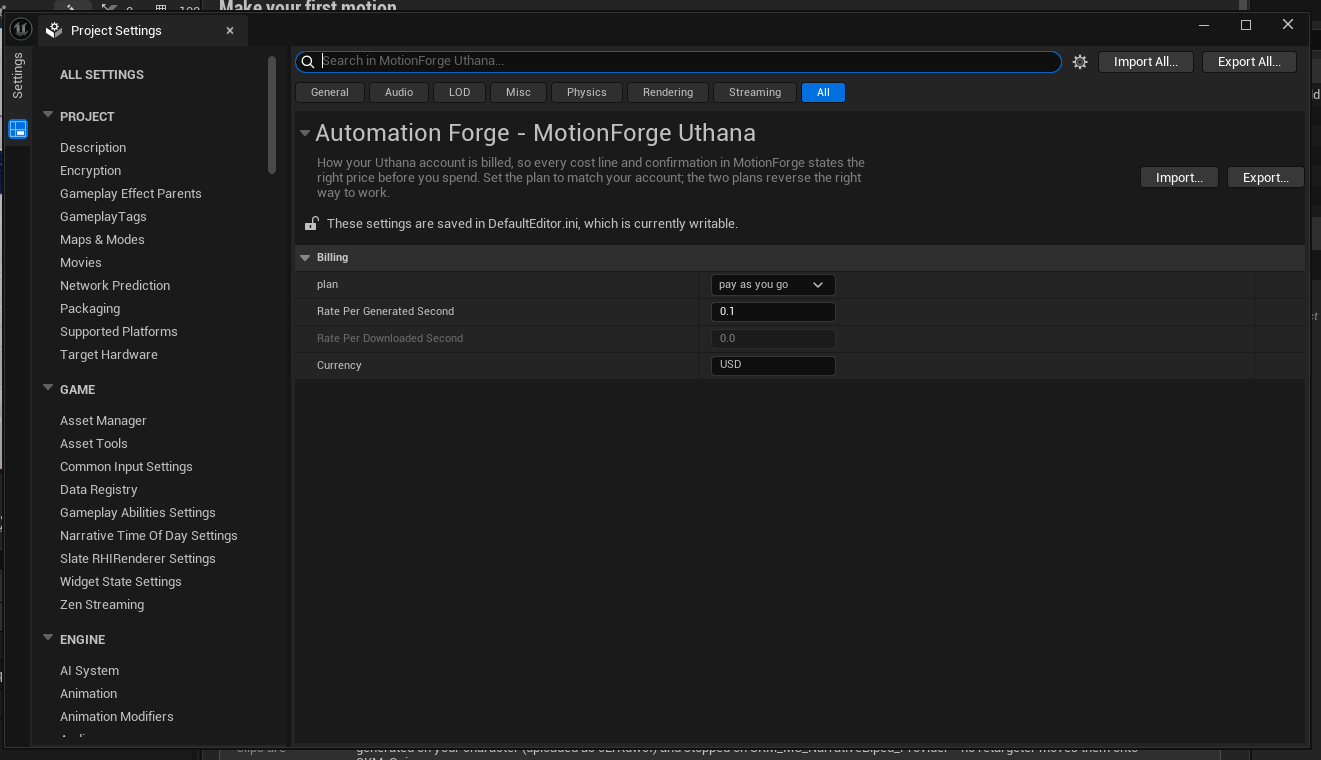
This is a project setting, not a per-person one: what your team is billed
is a fact about the project, so it belongs in a committed file. Contrast the
key itself, which is per person and never in an .ini — see
the three tiers.
Characters
Upload a character to Uthana, and list what the account already holds (including Uthana's stock characters). Re-uploading asks first.
Setup steps: the API key, the plan, a character on Uthana (counted from asset-registry tags, not loaded assets), and the connection.
Settings
model (only text-to-motion-3.0 offered) and rewrite_prompt (default on).
Seed and beat splitting are cleared from the request, so the record of
what was sent is accurate rather than aspirational.
Which to use
Reach for Kimodo when you want a reproducible recipe, when the work is under NDA, when you are iterating and the volume is high, or when you have a GPU sitting idle.
Reach for Uthana when you need fingers, when 60 fps matters, or when you do not want to run anything.
Neither choice is permanent. The definition survives the switch, and it keeps each provider's settings separately.