Sequencer
The Motion Prompt Track and the Motion Constraint Track.
Two Sequencer tracks, added from + Add ▸ Motion Prompt Track and Motion Constraint Track.
The reason they exist: a motion has a place in time long before it has a clip, and writing the prompt where the timing already lives beats writing it in a separate window and reconciling them later.
Motion Prompt Track
One section per beat.
| Action | What it does |
|---|---|
| Add Beat | A new section |
| Split at Playhead | Divide a beat where the playhead sits |
| Edit Beat Prompt | The text for that beat |
| Pull | Read the definition's beats onto the track |
| Bake | Write the track's beats back into the definition |
| Generate | Submit — and stop at review, with the real price |
Pull asks before replacing edited beats. A track you have been working in is not silently overwritten by what the definition last held.
A full stop divides a prompt into beats, and a full stop inside a beat is detected before submission — including a decimal point, which would otherwise split "1.5 metres" in two.
The timeline's Generate goes through the same review stop as everywhere else. It did not always: an earlier version imported without review, which meant the timeline was the one surface where a generated clip could reach your game unseen. Fixed in 0.4.0.
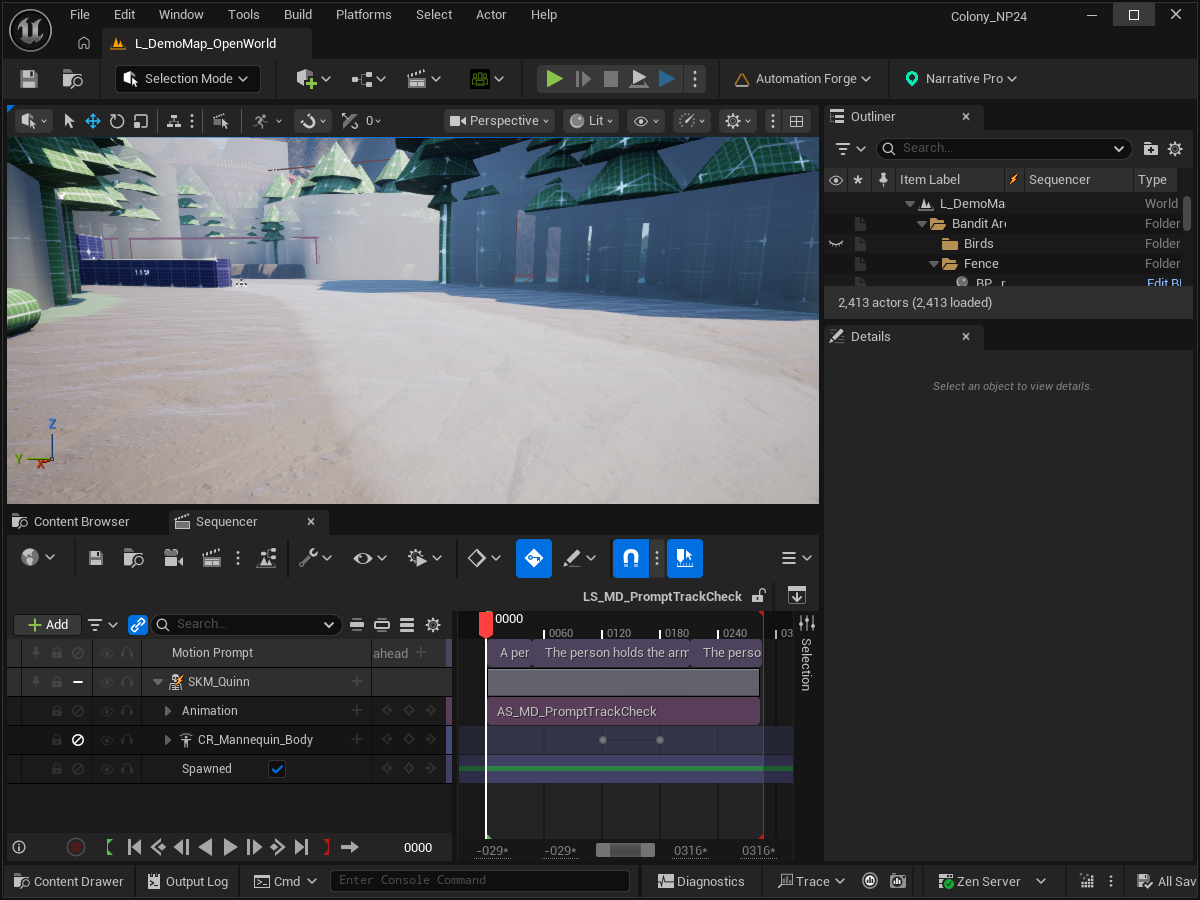
Open the timeline capture at full size.
Motion Constraint Track
Rig keys inside a span become generation constraints.
They are harvested from a transient, never-saved bake of the sequence, sampled only at keyed times — so posing on the timeline is authoring a constraint, not producing an asset you have to manage.
Poses keyed only on the timeline are read once per generation at submission and sent.
Pose actions
Pin a pose from an animation at the start, the end, both, or a moment, with a pose type. Plus Show what will be sent and Clear authored poses.
Pose actions are disabled, with the reason, on providers that take no poses. A greyed button that does not say why is worse than no button.
Baking, and what survives
The track and the definition are two views of the same beats, and Bake/Pull move between them. The definition is the committed artefact; the track is where timing is comfortable to author.
If you are wiring this into a wider cinematic: cinematics bind by tag, and one shot per beat is the arrangement that survives a re-generate.