Retargeting
Direct or through an IK Retargeter — how to tell which you need, and the traps in each.
A generated clip arrives on whatever skeleton the provider produced. Getting it onto yours is either trivial or the hardest part of the set, and which one depends on a single field.
The field that decides it
ProviderMesh on the Motion Character.
ProviderMesh | Route | What happens |
|---|---|---|
| Empty | Direct | The clip is built straight onto your skeleton, matching FK bone orientations plus a per-bone rest-pose alignment. No setup |
| Set | IK Retargeter | The clip is built on the provider's rig, then retargeted onto yours through a retargeter you author |
Direct is the default and the right answer whenever your character's proportions and bone orientations are close enough to the provider's. When they are not, you need a retargeter — and the character window tells you, including the case that matters most: when clips would stop on a provider rig for want of one.
The same project, two Motion Characters aimed at the same skeleton. The only difference that matters is one field:
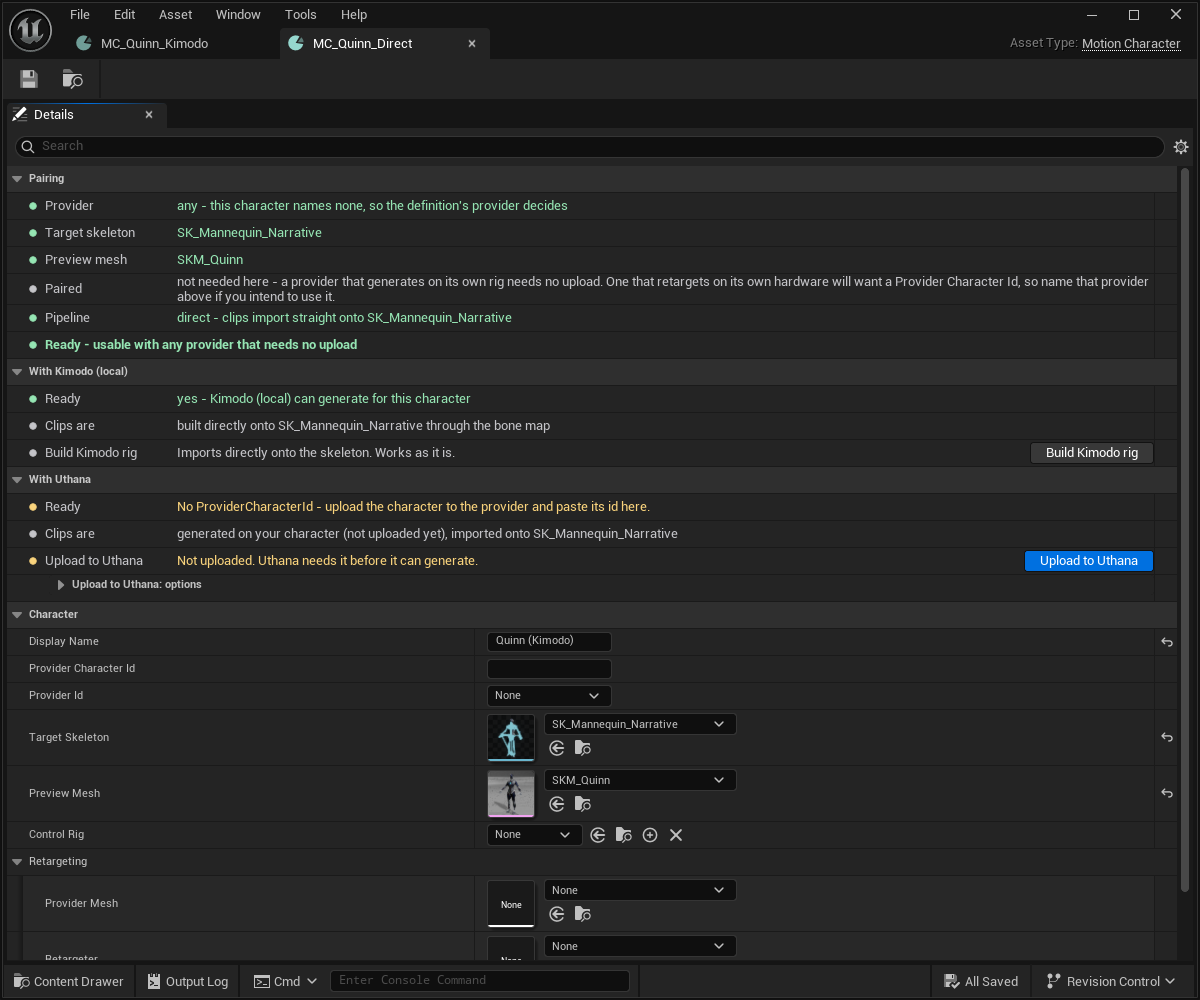
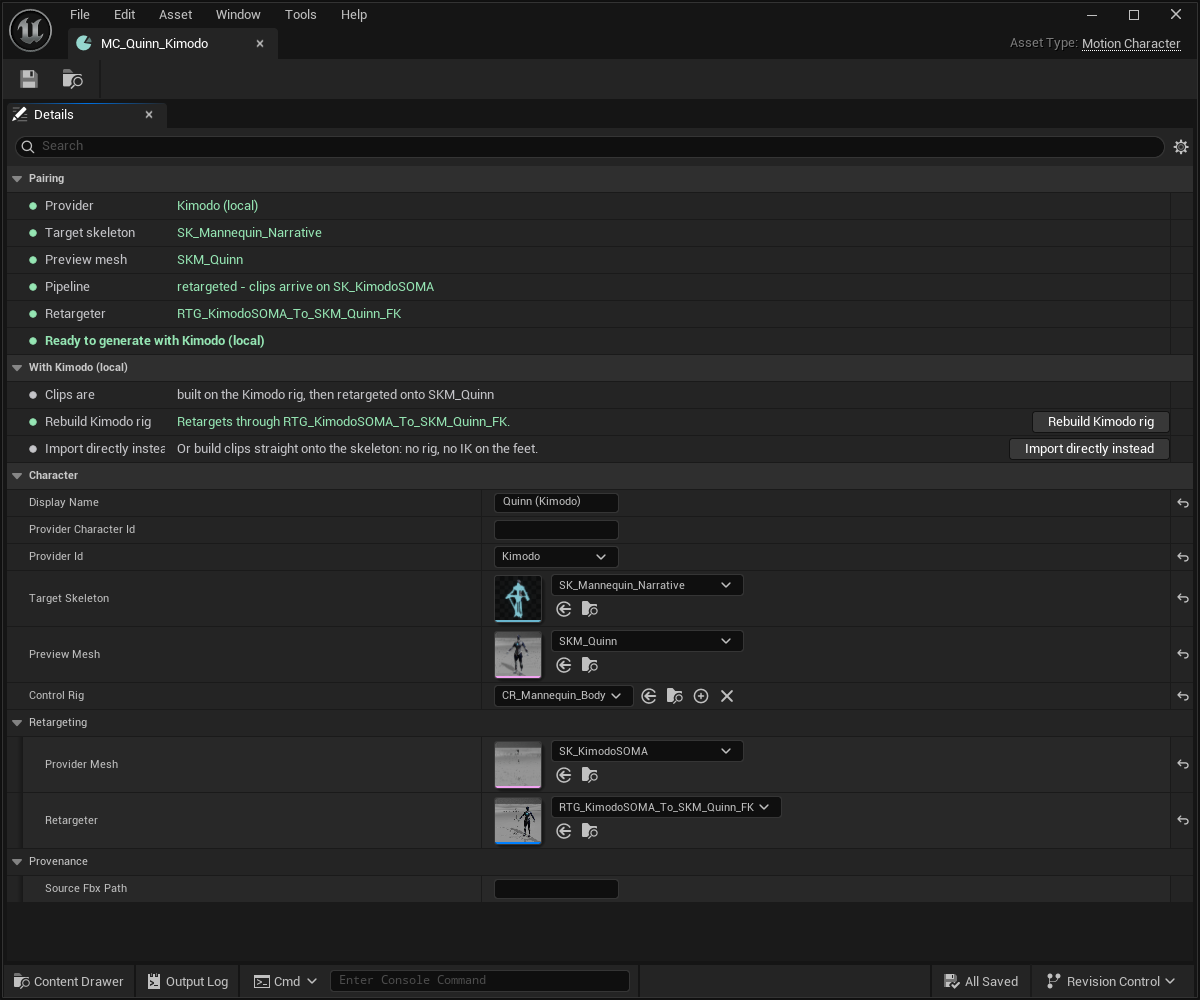
The window states the route as a sentence, not as a field you have to interpret: clips import straight onto SK_Mannequin_Narrative, or clips arrive on SK_KimodoSOMA. Read that line before generating; it is the cheapest check there is.
When the route stops short
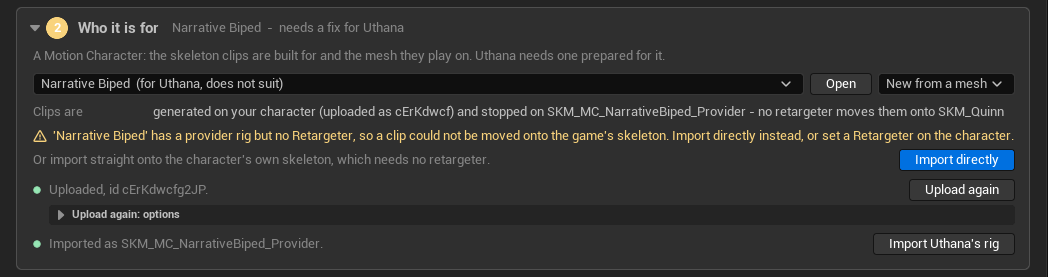
The case worth recognising on sight: a character that has a provider rig but no retargeter. The clip generates, arrives, and then has nowhere to go.
Building the provider rig
For Kimodo, Kimodo.CreateRig builds it procedurally — the SOMA skeleton and
mesh, source and target IK rigs in _FK and _HandIK variants, and the
retargeter.
No GPU is needed for this, because the rest pose is baked into the plugin rather than sampled from a generated clip.
Building the rig marks the character as that provider's. A provider mesh that is not the expected rig is refused with the reason, rather than producing a clip that is subtly wrong.
The traps
These cost real days. They are not MotionForge bugs — they are properties of Unreal's retargeting that anyone building this hits.
A retargeter with no ops does nothing — and does not error
UE 5.7 replaced the fixed FK-then-IK phases with a stack of retarget ops, and one created programmatically starts empty.
Nothing errors. The asset opens, both rigs are assigned, the chains map — and every clip retargets to the target's reference pose, which looks exactly like a clip whose source animation failed to import.
Remove all ops, then add the default ops, before generating a retarget pose — the pose generator reads the first op's chain mapping.
Auto Align runs on the source rig, never on your game's
Auto Align rotates each bone until its chain tangent points along its counterpart's. Matching one direction to another constrains two degrees of freedom and leaves the twist about that axis to the minimal rotation.
On arms that is harmless — the A-pose-to-T-pose swing dominates. On spine and neck both chains already point nearly straight up, the swing is about zero, and what survives is pure unconstrained twist. The result: arms correct, torso and head turned 90°.
It also skips the pelvis entirely, so a yaw sitting on the pelvis never gets reconciled with the limbs.
Aligning the source puts every approximation on the generated, regenerable rig and leaves your own skeleton resting exactly as authored.
A mesh and its skeleton can hold different rest poses
USkeletalMesh::GetRefSkeleton() and USkeleton::GetReferenceSkeleton() are
not the same thing. On one character in our own production: the mesh
carries 166 bones, the skeleton asset 361, and their hips sit 2.9 cm
apart.
This matters wherever a pose is expressed relative to a rest pose and something later cancels that rest term out — every retarget, every pose conversion.
The rule: the rest pose you cancel through must be the one the pose was sampled in.
- A pose read off a posed skeletal mesh component is in that mesh's space, with translation retargeting already applied by evaluation.
- A pose sampled from an animation sequence is in the skeleton's space, raw.
Getting this wrong is not a crash and not obviously wrong on screen. It showed up for us as about 3.4° on the chest and a character standing 2.9 cm too tall — mild enough to pass every check, wrong enough to degrade a constraint.
MotionForge records which one a pose came from, and the provider picks the rest pose per key from that. If you are writing your own node that touches poses: never let a function derive "the skeleton" from context. Pass the reference skeleton in.
Fingers and untracked bones
A clip's untracked bones — fingers, in-between spine — are posed from the hand-pose clip, but only when that clip is on the same skeleton.
That restriction exists because the alternative produced clawed hands. Filling untracked bones from a pose sampled on a different skeleton is the rest-pose-mismatch trap above, wearing a costume.
Judging the result
When you are deciding whether a retarget worked, subtract the root. A clip that translates correctly but rotates wrongly, and a clip that does the reverse, look similar in a viewport at speed and completely different in a game.
The other half of judging a clip is MotionForgeQuality, which measures penetration rather than asking you to see it.
Normalisation is off, and stays off
There is an optional Blender normalisation pass in the plugin. It is off by default and the executable path is left empty by design.
It is blocked on an axis and rotation problem — the normalisation script rotates clips, off by a switch — and shipping it on would silently turn correct clips wrong. Trimming and root-translation stripping are wired up and waiting behind the same block.